An assistant inside your scheduler, inbox and analytics
Your AI social media manager, built into Viraly
You connect your channels, ask in plain words and approve what matters. Viraly answers from your posts, inbox and numbers, drafts and schedules posts, prepares replies and writes your weekly digest, with a card before anything in your workspace changes.
- Included on every plan, Free too
- A card before every change
- Undo for 30 days on drafts and settings
Read 3 drafts and the best Instagram hours from October
Schedule the treatment room post for Thursday at 11:00 on Instagram
Caption and image are ready. 11:00 on Thursday is the hour that did best for you in October, and nothing goes out until you approve.
A card like this comes before every change to your workspace.
11
networks under one assistant
200+
things it can do across posts, inbox, analytics and bio pages
1 card
before every change to your workspace
30 days
of Undo on drafts and settings
Activity
a log of who asked, what changed, and Undo
Off
a switch for every routine, and one for the whole workspace
In plain words
Ask in plain words and it does the work
Viraly's AI social media assistant answers from your own posts, inbox and numbers, and makes the change you ask for once you approve the card. Here are six requests it handles today, and what happens after each one.
“What did my best post this week do?”
Reads at onceThe answer comes back with the numbers it read, and nothing in your workspace changes.
“Find free slots next week and schedule my newest drafts.”
Shows a card firstIt finds the gaps in your queue and proposes a slot for each draft. Nothing is scheduled until you approve.
“Which comments still need a reply? Suggest an answer.”
Sending always asksIt lists what is waiting and drafts an answer. Sending the reply is your call every time.
“Move Thursday's post to 11:00.”
Shows a card firstOne card, one approval, and the change sits in the Activity log with Undo for 30 days.
“Add our new guide to the bio page.”
Shows a card firstThe link goes on your bio page only after you approve the card.
“Which channels need reconnecting?”
Reads at onceIt names the channels with an expired or failed connection and hands you the reconnect link for each.
It works on the social set you have open, so you never have to say which brand or which channels you mean. Open it from the top bar on any page of the app (you will see it labelled Copilot in the app today) and the answer comes back in the same panel.
How it works
Ask, confirm, undo
Viraly's assistant works inside the app you already use. These are real screens, not mockups.
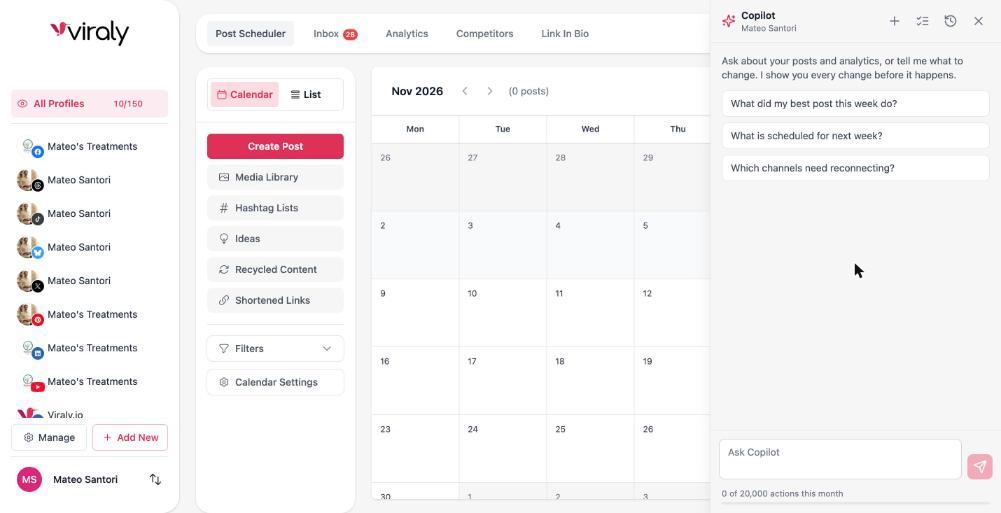
1. Ask
Open the panel on any page and ask about your posts, inbox or numbers in plain words. It knows the social set you have open.
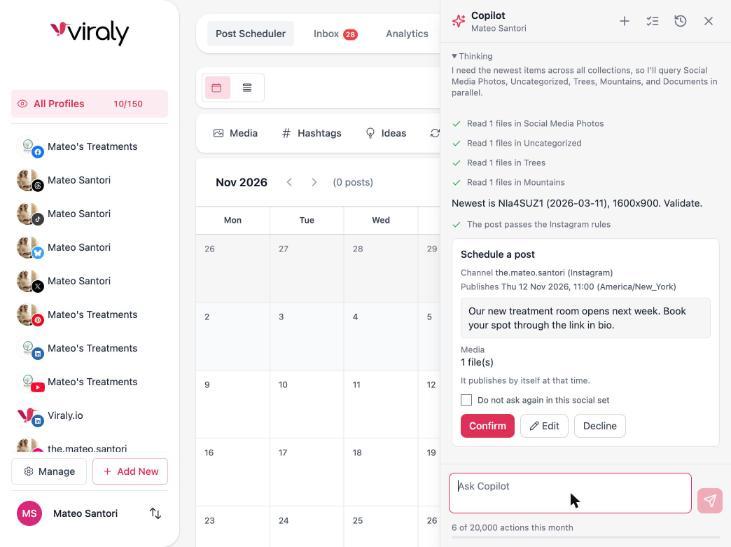
2. Confirm
Reads run at once. Anything that changes your workspace shows a card first with the exact change, and publishing now, replies and deletes always ask.
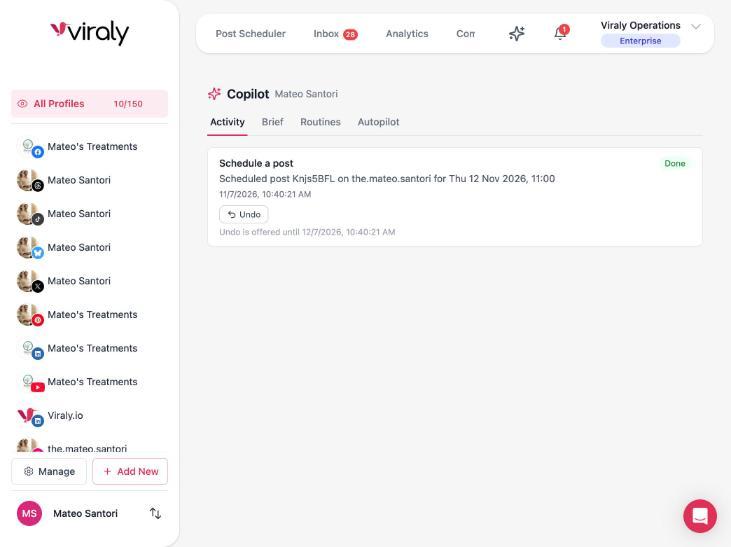
3. Undo
Every change lands in the Activity log with who asked, what changed and an Undo button that stays for 30 days.
Control
Trust is built in
A virtual social media manager earns trust by showing its work, so every part of Viraly's assistant is visible: what it read, what it proposes, what it changed and how to take it back.
Reads run at once, writes show a card
Ask a question and the answer comes straight back, with a line that shows what it read. Ask for a change and you see exactly what will change before it happens, so you can confirm it, edit it first or decline it.
Publishing, replies, DMs and deletes always ask
Anything that leaves your workspace or cannot be taken back needs your yes every time: publishing now, a reply or a DM, a delete, a channel change. No routine does these on its own today, and the replies a routine suggests wait as notes until a person sends them.
Undo for 30 days, with an Activity log
Every change to drafts and settings sits in the Activity log with who asked, what changed and an Undo button, for 30 days. A published post can be deleted but not undone, which is exactly why publishing asks first.
Your data stays yours
Prompts carry only the social set you are working in and your brief, and your access tokens never enter one. Comments and messages are treated as data, never as instructions, and nothing is used to train models.
What reaches a model, in plain wordsEvery routine has its own Off switch, and the workspace owner has one switch that turns the assistant off for everyone in the workspace.
Routines
Routines: the work that runs while you sleep
Routines are the work between your conversations. Each routine does one job on its own schedule, within the caps shown on its card, and reports inside the app and in the bell, not by email yet.
Level 1
Watch and report
These only read. You get digests and alerts, and nothing in your workspace changes.
- Weekly performance digest: the last 7 days against the 7 before, with the top and worst posts and one suggestion each.
- Monthly report: the analytics export plus a short narrative per channel and per category for last month.
- Anomaly alerts: drops or spikes in followers and engagement, a streak of failed publishes, a channel that stopped syncing.
- Channel health watch: expiring or failed tokens, channels that need a reconnect, and the posts that will fail because of them.
- Pre-flight check: validates every post due in the next 48 hours against the network's rules.
- Competitor watch: competitors' top posts, cadence changes, new hashtags and the formats that worked.
- Inbox digest: what is waiting for a reply, oldest first, grouped by type.
Level 2
Prepare work
These prepare drafts, labels, suggestions and collections inside your workspace, and every write can be undone. A person confirms anything that goes out.
- Weekly content drafts: the week's drafts per channel from your ideas, feeds and top performers, each with a proposed slot, and it schedules nothing.
- Inbox triage: labels, priority and assignment on new conversations by your rules, and it never replies.
- Suggested replies: a reply draft saved as a note on conversations labelled question or lead, and a person sends it.
- Feed to drafts: a draft with the link preview and a short take for new feed items that match your keywords, up to a daily maximum.
- Recycle top performers: fresh drafts with a refreshed caption from top posts that have not been recycled in 180 days.
- Alt text: writes alt text where it is missing on new images in drafts and scheduled posts.
- Pre-flight auto-fix: only the safe fixes you allow, such as a media re-render or missing alt text, and it never edits captions.
- Hashtag refresh: new lists from the last 90 days of performance, saved as Suggested, and it never edits an existing list.
- Competitor ideas: idea cards for the formats and topics that worked for competitors.
- Media library tidy: unused and duplicate media gathered into a collection called Review for deletion, and it never deletes.
Every card shows the routine's level, the model it runs on, its schedule and its last run, with one button to switch it on.
A third level, routines that act on their own under a daily cap (recover a failed post, fill empty slots from a pool you approved, move next week's posts to their best hours), is built and switched off today until it is finished.
Works where you work
The same tools reach Claude, ChatGPT, Cursor and any MCP client through the Viraly MCP server, with the scopes you grant to the connection. So the AI social media assistant you already talk to can draft, schedule and report through your Viraly account, under the same permissions and the same ask-first rules as the panel.
Set up the MCP serverOn every plan
The assistant is included on every plan, Free included, and so is the MCP server. Each plan comes with a monthly number of actions (one per request you make or routine run) that grows as you move up, and the meter at the bottom of the panel shows what is left this month. The scheduler, inbox, analytics and link in bio come on the same plans.
Compare plansWhat people ask about an AI social media manager
The answers are short, in plain words, and each one is true of the product today.
Can AI manage my social media?
Yes, with you approving what matters. Ask Viraly's assistant in plain words and it reads your posts, inbox and numbers at once, drafts and schedules posts and prepares replies, and a routine writes the weekly digest. A card shows every change before it happens, publishing and replies always ask, and Undo covers drafts and settings for 30 days.
Is there an AI social media manager?
Yes. Viraly is one, built into a scheduler that covers 11 networks, with the inbox, analytics and link in bio beside it. You ask in plain words, it reads or proposes, and you approve the card. Routines watch your channels, write digests and prepare the week's drafts in the background, each with its own switch.
What is the best AI social media manager?
The best one shows its work. It tells you what it read before it answers, shows a card before every change, keeps a log you can undo from, and runs only inside limits you set. Viraly's assistant was built that way from the start, so you can judge it on real screens rather than on promises.
How do I use AI to manage social media?
Start with one small job: connect a channel, open the panel and ask what your best post did this week, which comments are waiting for a reply or where next week has free slots. Confirm the cards you agree with and decline the rest. When that feels normal, switch on a routine like the weekly digest or inbox triage.
Will AI replace social media managers?
No. It takes the reporting, the drafting and the inbox triage, which is most of the hours and the least of the judgement. You keep the decisions: what the brand says, which reply goes out and when a post is published. Viraly is built around that split, with a card between the assistant and anything that reaches your audience.
Can ChatGPT or Claude post to social media?
Yes, through the Viraly MCP server. Connect it to Claude, ChatGPT, Cursor or any MCP client and it gets the same tools as the panel, with the scopes you grant and the same rules: reads run at once, reversible writes are logged with Undo, and anything that goes out needs your yes. It is on every plan.
Does Viraly train AI on my data?
No. Nothing you write or receive is used to train models, not by Viraly and not by the model providers it works with. Prompts carry only the social set you are working in, access tokens never enter a prompt, and comments and messages are treated as data, never as instructions. The AI trust page has the full list.
Which plans include the assistant?
Every plan includes it, Free as well, with a monthly number of actions (one per request you make or routine run) that grows as you move up the plans. The meter at the bottom of the panel shows what is left this month, and the number resets at the start of each month.
What reaches an AI model, and what does not
Prompts carry only the social set you are working in and your brief. Access tokens never enter a prompt. Comments and messages are treated as data, never as instructions. Nothing is used to train models.
Give Viraly its first job.
Start free, connect a channel and ask for something small: your best post this week, the comments waiting for a reply, next week's free slots. You approve what matters.