Free tool
Engagement rate calculator for Instagram, TikTok, Facebook and more
This free engagement rate calculator works for any social network and needs no signup. Enter your followers, likes and comments, and the rate updates as you type with the formula written out underneath in your own numbers.
Everything runs in your browser, so nothing you type in leaves the page.
The formula
How to calculate engagement rate
Engagement rate is the engagement a post received, divided by the people who could have seen it, times 100. Measure it by followers to compare accounts, or by reach to see how the people who actually saw a post responded.
By followers
(likes + comments + shares + saves) divided by followers, times 100
This is the number most reports and most social media engagement rate calculators give you, and it's the one to use when you compare accounts of a similar size.
By reach
(likes + comments + shares + saves) divided by reach, times 100
Reach, or views on a video network, is the audience a post actually had, so this version is fairer for big accounts and for networks like TikTok and YouTube where most viewers never followed you.
Here's how it works with real numbers:
Take an account with 12,400 followers. One post collected 486 likes, 37 comments, 22 shares and 61 saves, and Instagram says it reached 9,850 people.
- 1Add up the engagement: 486 + 37 + 22 + 61 = 606.
- 2Divide by followers: 606 divided by 12,400 = 0.0489.
- 3Multiply by 100: 0.0489 times 100 = 4.89%. That is the engagement rate by followers.
- 4For the rate by reach, divide by reach instead: 606 divided by 9,850 = 0.0615, so 6.15%.
Across several posts, take the average first. If the last 10 posts gathered 5,120 engagements between them, that is 512 per post, and 512 divided by 12,400, times 100, is 4.13%, which is the account's engagement rate over those 10 posts. Fill in the posts count above and the calculator does this step for you.
By network
Engagement rate formula by platform
The engagement rate formula is the same on every network, and what changes is which actions count as engagement and what stands in for reach. Pick the network above and the calculator uses these definitions.
Likes, comments, shares and saves count, over followers or reach. Saves matter because they are the action people take when they plan to come back, so an Instagram engagement rate calculator that leaves them out undercounts carousels and how-to posts.
TikTok
Likes, comments, shares and saves count, over followers or views. Use it as a TikTok engagement rate calculator with views filled in, because the For You feed sends most videos to people who don't follow you and followers alone understate the audience.
Reactions, comments and shares count, over Page followers or post reach. Count every reaction the same in a Facebook engagement rate calculator, and use reach for a Page with a large, quiet audience, since most followers never see a given post.
Reactions, comments and reposts count, over followers or impressions. LinkedIn reports impressions rather than reach, so the rate by reach on LinkedIn is really a rate by impressions, and it runs a little lower than the same post would on a reach basis.
X
Likes, replies and reposts count, over followers or views. Bookmarks are optional and worth adding when you track them, since a bookmarked post is one somebody wants to come back to.
YouTube
Likes and comments count and nothing else, over subscribers or views. Views are the fairer base for a YouTube engagement rate calculator, since most of the people watching a video never subscribed.
Threads
Likes, replies and reposts count, over followers or views. Quotes are reposts with a comment attached, so count them with the reposts.
Bluesky
Likes, replies and reposts count, over followers. Bluesky does not show a view count, so the rate by followers is the only one you can calculate, and it compares fairly across accounts of a similar size.
Saves, Pin clicks, outbound clicks and comments count, over followers or impressions. Saves are the action that matters most on Pinterest, because a saved Pin keeps being shown long after you posted it.
Benchmarks
What is a good engagement rate?
A good engagement rate is one that beats your own average, because the figures people quote differ by network, by account size and by format, and a number pulled from somebody else's audience tells you little about yours.
Averages differ by network because each one counts different actions and shows posts to different people. A rate by followers on TikTok, where the For You feed reaches far past your followers, means something different from the same rate on LinkedIn, where most of the people who see a post follow you already.
Account size matters just as much. A small account's followers tend to know the person behind it and react to most of what they post, while a large account's followers include a lot of people who followed once and moved on, so the rate by followers falls as an account grows even when the posts get better. That is why the rate by reach is the fairer number for a big account, since it measures how the people who actually saw the post responded.
Format matters too. Carousels collect saves, Reels and short videos collect views and shares, and a text post collects replies, so comparing a video with a photo on the same rate tells you about the format rather than the post.
So, if you came here asking what a good engagement rate on Instagram is, the useful answer is your own last 30 posts. Put them through the calculator, take the average, and treat anything above it as good. The posts above the line usually share something (a format, a topic, a caption that asks for a reply), and that is the thing to make more of.
Reading the number
Why the number moves
The rate moves with the format you post, the time you post it, what the caption asks for and who your followers are, so a drop is rarely a mystery once you look at those four.
Format
Video and carousels usually earn more engagement per follower than a single image, and a Reel that lands on the Explore page can double a post's reach without adding a follower. Compare like with like: Reels against Reels, carousels against carousels.
Timing
A post that goes out when your followers are online collects its first reactions quickly, and most feeds show a post with early engagement to more people. The same post at a quiet hour reaches fewer people and ends with a lower rate for no other reason.
Caption asks
A caption that asks a question, or asks people to save the post for later, changes which actions you get. Comments and saves both count, so a clear ask lifts the rate, and a caption that asks nothing usually ends with likes alone.
Follower quality
Followers who came from a giveaway, a follow-for-follow spree or a bought list rarely react to anything, so they sit in the denominator and drag the rate by followers down for months. Growth that comes from the content itself keeps the rate steady as the account grows.
In Viraly
Track it automatically in Viraly
Connect a channel and Viraly reads engagement per post and per channel across every network it has analytics for, so there is nothing to type in and nothing to recalculate when a post keeps collecting comments.
Engagement per post and per channel
Viraly reads every post's likes, comments, shares and saves (where the network reports them) and every channel's totals from the networks themselves, keeps them up to date and shows your top posts for any period you pick.
Best times from your own data
Viraly shows the hours and days that did best for each channel, from your own numbers rather than a generic chart, so the timing question answers itself.
Ask in plain words
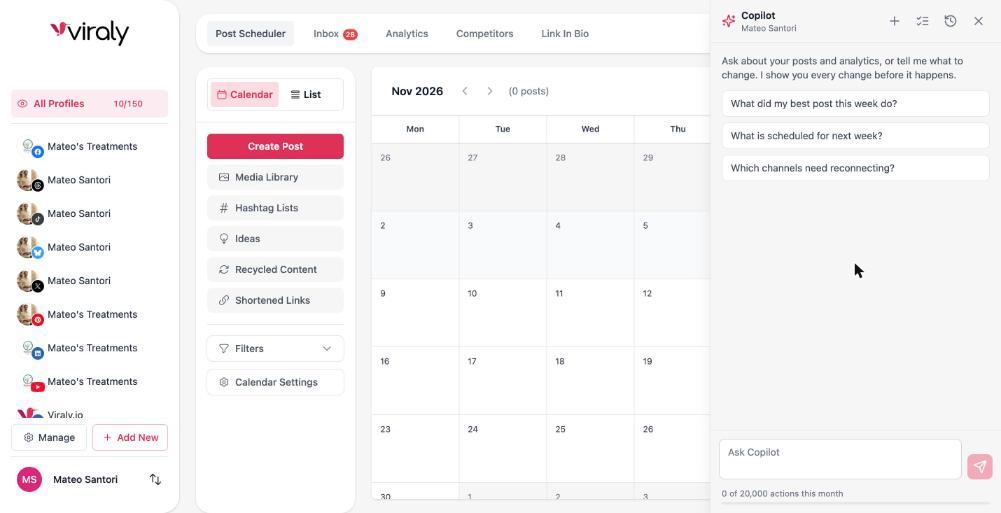
Open the assistant on any page and ask what your best post this week did. It reads your numbers and answers, and anything that would change your workspace shows a card first.
Questions people ask about the engagement rate calculator
How do you calculate engagement rate?
Add up the engagement a post received, which means likes, comments, shares and saves where the network has them, divide the total by your followers and multiply by 100. For the fairer number on a large account, divide by the post's reach or views instead. The calculator above does both and writes the formula out with your numbers.
What is the engagement rate formula?
Engagement rate is likes plus comments plus shares plus saves, divided by followers, times 100. Swap followers for reach or views and you get the rate by reach. Across several posts, use the average engagement per post in place of one post's total, which is what most reports mean by an account's engagement rate.
What is a good engagement rate on Instagram?
There is no single number, because the rate depends on account size, on whether you post Reels, carousels or single images, and on whether you measure by followers or by reach. The useful benchmark is your own average over the last 30 posts: anything above it is good, and those posts show you what to make more of.
Is this Instagram engagement rate calculator free?
Yes. It's free, it runs in your browser and it needs no signup, so nothing you type in leaves the page. Use it as often as you like for Instagram, TikTok, Facebook, LinkedIn, X, YouTube, Threads, Bluesky or Pinterest. If you'd rather not type numbers in at all, Viraly tracks them for every channel it has analytics for.
Can the TikTok engagement rate calculator use views instead of followers?
Yes. Enter views and the calculator shows the rate by views next to the rate by followers. On TikTok the rate by views is usually the more useful one, because the For You feed shows videos to many people who don't follow you, so followers alone understate the audience a video actually reached.
Can Viraly track engagement rate for me?
Yes. Connect a channel and Viraly reads the engagement on every post and channel it has analytics for, keeps the numbers up to date and shows the best posting times from your own data. You can also ask the assistant in plain words what your best post this week did, and it answers from your numbers.
How do you calculate engagement rate across several posts?
Add up the engagement on all of them, divide by the number of posts to get the average per post, then divide that by your followers and multiply by 100. The calculator does this when you fill in the posts count. If you have reach for the same posts, add that up too and use the rate by reach.
Stop calculating it by hand.
Connect a channel and Viraly keeps the engagement rate of every post and every channel up to date, with best times from your own numbers.