Three rules for every action an agent takes
What a social media agent should do on its own, and what it should ask first
An AI agent for social media reads your accounts and makes changes through tools, so the useful question is which changes it should make alone. This page defines the category, sorts every action into three kinds and tells you how Viraly's agent handles each one.
- The agent is included on every plan, Free too
- A card comes before every change
- Publishing, replies and deletes always ask
Each request meets one of three rules.
- Reads run at once
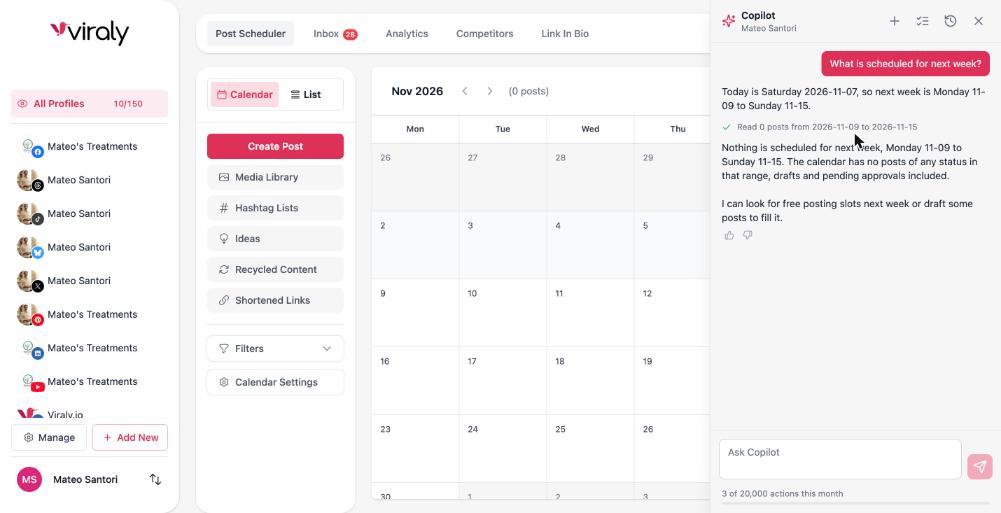
“What is scheduled for next week?”
The answer comes back at once, with a line above it that shows what it read.
- Writes show a card first
“Move Thursday's post to 11:00.”
A card shows the exact change, and you confirm, edit or decline it. Undo stays for 30 days.
- Outward actions always ask
“Reply to Dana's comment with this answer.”
Sending asks you every time, because a sent reply cannot be unsent.
Every one of Viraly's 211 tools belongs to one of these three classes.
What is an AI social media agent?
The word agent gets attached to anything with a chat box. Here is the plain meaning, and the one difference a buyer should care about.
An AI social media agent is software that uses a language model to read your social accounts and take actions in them through tools. You ask for something in plain words, the model works out which tools answer the request, and the tools do the reading and the changing: they list the posts on your calendar, pull last week's numbers, schedule a draft or label a conversation.
A chat assistant stops one step earlier. It writes a caption, a reply or a plan as text, and you carry that text into the tool that publishes. The agent carries it for you, and that is what makes the rules matter. The moment software can change your accounts, you need to know which changes it makes alone, which ones it shows you first and which ones it never makes without you.
Whether a vendor calls it a social media AI agent or an AI social media assistant, the rules under the name are what you are buying.
A chat assistant writes.
A social media agent acts.
It writes a caption that you paste into another tool.
It writes the caption and schedules the post once you confirm the card.
It answers from whatever you type into the chat.
It answers from your real posts, inbox and numbers, and it shows what it read.
It knows nothing about your accounts until you explain them.
It works on the social set you have open and reads your brief before every answer.
It cannot undo anything, because it changed nothing.
It logs every change in an Activity log with Undo for 30 days on drafts and settings.
Every action an agent takes is one of three kinds
Sort any action by how easily it can be taken back and the right rule follows. Here is how Viraly applies each one.
Reads run at once
A read looks and changes nothing: the posts on your calendar, the conversations waiting in the inbox, last week's numbers, the state of each channel's connection.
Viraly's rule: Viraly runs a read straight away and prints a line with what it read above the answer, such as the posts it counted and the date range, so you can check the answer against its source.
108 of Viraly's 211 tools are reads.
Reversible writes show a card first
A reversible write changes something inside your workspace that can be put back: a scheduled post, a moved slot, a draft, a label on a conversation, a link on a bio page, a hashtag list.
Viraly's rule: Viraly shows a card with the exact change, down to the channel, the time, the caption and the media, and you confirm, edit or decline it. Every confirmed change sits in the Activity log with Undo for 30 days.
76 tools are reversible writes.
Outward actions always ask
An outward action reaches your audience or cannot be taken back: publishing now, a reply, a DM, a delete, disconnecting a channel.
Viraly's rule: Viraly asks every time before any of these happens, and no routine performs one on its own. A published post can be deleted but never undone, which is exactly why publishing asks first.
27 tools ask every time.
Move Thursday's post to 11:00 on Instagram
11:00 is the hour that did best for you in October. Nothing moves until you confirm, and Undo stays for 30 days.
A card like this comes before every reversible write. A real one, for scheduling a post, is on the AI social media manager page.
The split is not a setting you have to configure. Each of Viraly's 211 tools carries its risk class in code, and a policy check on every call decides allow, ask or deny from your role, your plan, the scopes of the connection and that class.
The same check runs for a question in the panel, a routine at 07:00 and a request from Claude through the MCP server, so the rule you read on a card is the rule the software follows everywhere.
What Viraly's agent does today
Each job takes one sentence, and all of it is live for members now. The AI social media manager page shows the panel, a real card and the Activity log.
Reads: what is scheduled, what is waiting in the inbox, which posts and hours did best, which channels need reconnecting, and a caption, hashtags, alt text or ideas when you ask for them.
Writes with a card: a draft scheduled into a free slot, a post moved to a better time, a link added to a bio page, a hashtag list, an idea card or an evergreen schedule, each one in the Activity log with Undo.
Asks first: a reply, a DM, publishing now, a delete, a channel disconnected. It also checks a post against the network's rules before it schedules it and tells you when a post cannot go out as it is.
In the app today the panel is labelled Copilot, and it opens from the top bar on any page, on the social set you have open.
Routines are agents that run on a schedule
A routine is the same agent with one job and a timetable. It runs on its own, within the caps on its card, and it reports inside the app and in the bell, not by email yet.
Level 1 routines watch and report. They only read, so a digest or an alert arrives and nothing in your workspace changes.
Level 2 routines prepare work: drafts, labels, suggestions and collections inside your workspace, every write undoable, and a member confirms anything that goes out.
Level 3 routines would act outward on their own under a daily cap, a code check on every write and a kill switch. All four are switched off in production today, so no routine in Viraly schedules, publishes or reschedules anything by itself, and this page changes when that does.
Every routine has its own Off switch, and the workspace owner has one switch that turns the agent off for everyone in the workspace. See the routines and what each one does.
The same agent works inside Claude, ChatGPT or Cursor
You may already talk to an AI assistant every day. The Viraly MCP server gives Claude, ChatGPT, Cursor and any MCP client 126 tools over your posts, media, analytics, bio pages, short links and comment rules, drawn from the same registry the panel uses, so each tool keeps its risk class wherever it is called: reads run at once, reversible writes are logged with Undo, and outward actions need your yes.
A connection sees only the tools its granted scopes and your plan allow, and the MCP server is included on every plan.
Set up the MCP serverThree of the 126 tools show how the risk class travels.
list_postsReads run at onceIt lists the posts in a date range and runs at once.
schedule_postWrites show a card firstIt schedules a draft, and the write is logged with Undo.
publish_nowOutward actions always askIt publishes immediately, so it needs your yes every time.
How to judge any social media AI agent
Five questions settle most of what separates AI agents for social media. Ask them of every vendor, and here is how Viraly answers each one.
- 1
Does it show what it read?
Viraly's answer: Yes. Whenever the agent reads your data, the answer carries a line with what it read, such as the posts it counted and the date range, above the answer itself.
- 2
Does it show a card before a change?
Viraly's answer: Yes. Every change to your workspace shows a card with the exact change, and you confirm, edit or decline it before anything happens.
- 3
Can you undo?
Viraly's answer: Yes, for 30 days on drafts and settings, from the Activity log, which also records who asked and what changed. A published post can be deleted but not undone, which is why publishing asks first.
- 4
What always asks?
Viraly's answer: Publishing now, replies, DMs, deletes and channel changes ask every time, and no routine does any of them on its own today.
- 5
Where does the data go?
Viraly's answer: Prompts carry only the social set you are working in and your brief, access tokens never enter a prompt, the Claude models run on Amazon Bedrock inside Viraly's own AWS account in the United States, and nothing is used to train models.
The fifth question has a page of its own. The AI trust page lists what reaches a model, where it runs, what Viraly keeps and for how long, and what is not done yet. Read the AI trust page.
Questions people ask about social media AI agents
Each answer is short, in plain words, and true of Viraly today.
What is a social media agent?
A social media agent is software that uses an AI model to read your social accounts and take actions through tools, such as scheduling a post, labelling a conversation or moving a slot. A chat assistant only writes text for you to paste. The agent's value depends on the rules it follows before each action.
Is Viraly a social media AI agent?
Yes. Viraly's assistant reads your posts, inbox and numbers and makes changes through 211 tools, with a rule for each: reads run at once, reversible writes show a card and can be undone for 30 days, and publishing, replies, DMs and deletes ask every time. Routines run the same way on a schedule.
Can an AI agent for social media publish posts on its own?
No, not in Viraly. Publishing now, replies, DMs and deletes ask every time in the panel, and no routine does them on its own. A post it schedules goes out at its time only after you confirmed its card, and the routines that would schedule or reschedule posts on their own are built and switched off in production today.
What is the difference between an AI agent and an AI assistant for social media?
An AI assistant for social media writes text: captions, replies, hashtags and ideas. An agent also acts, reading your accounts through tools and making the change, such as scheduling the post or labelling the conversation. Viraly does both, and each tool carries a risk class that decides whether it runs at once, shows a card or asks you first.
What are AI agents in social media advertising?
In advertising, an AI agent adjusts bids, budgets and audiences inside an ad platform on its own, within limits the advertiser sets. Viraly's agent works on the organic side instead: scheduled posts, the inbox, analytics, competitors and bio pages. It does not touch ad accounts, so an ads agent and Viraly sit side by side.
How do you route social media comments to support agents?
In Viraly, the inbox triage routine labels each new conversation, sets a priority and assigns it by the rules you write, every 15 minutes, and it never replies on its own. A suggested replies routine can then draft an answer as an internal note on the conversation, and a person on your team sends it.
How do you build an AI agent for social media?
You can skip the build. Viraly's MCP server gives Claude, ChatGPT, Cursor or any MCP client 126 tools over your posts, analytics, bio pages and comment rules, with the scopes you grant and the same rules as the panel. Connect it from the MCP page and give your assistant its first job in plain words.
Which plans include Viraly's agent?
Every plan includes it, Free as well, and the MCP server comes with every plan too. What changes by plan is the monthly number of actions, one per request you make or routine run, and the meter at the bottom of the panel shows what is left this month. The pricing page compares the plans side by side.
What reaches an AI model, and what does not
Prompts carry only the social set you are working in and your brief. Access tokens never enter a prompt. Comments and messages are treated as data, never as instructions. Nothing is used to train models.
Give Viraly its first job.
Start free, connect a channel and ask for something small: your best post this week, the comments waiting for a reply, next week's free slots. You approve what matters.