Viraly runs many client brands from one account
White label social media management: every client in one account, your name on all of it
You group each client's channels into a social set, give your team and your clients the role they need, and send posts for approval where the client already works. Viraly runs the calendar, inbox, analytics, bio pages and the assistant inside each set, and on Enterprise it does all of that under your logo, colors, brand name and domain.
- Social sets are unlimited on every plan
- Approvals come from Slack, Teams, Discord or the app
- The assistant is included on every plan
Juniper Dental
2 members and 1 clientInstagram, Facebook and LinkedIn
Harbor Coffee Roasters
1 member and 1 clientInstagram, TikTok and Pinterest
Bright Path Realty
3 members and 2 clientsFacebook, LinkedIn and YouTube
Pick a set and the calendar, inbox, analytics, bio pages and the assistant work inside it.
Social sets and roles
One account, every client brand
An agency account is one workspace with a social set per client. You pick the set, and everything you open belongs to that client, so nobody posts to the wrong brand and a member only sees the sets you gave them.
A social set per client
A social set groups one client's channels into one brand with its own timezone, calendar, inbox, analytics, bio pages and assistant. Social sets are unlimited on every plan, Free included, so your plan is decided by the social profiles you connect and the people who work in the account, not by how many clients you have.
Owner and Members
The Owner holds the workspace and its billing. Members do the work in the sets you assign to them, with permissions you set per person. Business includes 3 team members, and Agency and Enterprise include unlimited team members.
The Client role
A client gets a login of their own with read-only access to the calendar and analytics, plus the right to approve or reject posts. They cannot edit or publish anything, which is exactly enough for sign-off. The Client role is part of white label, so it comes with Enterprise.
Agency includes 50 social profiles and Enterprise includes 150, and you can add more profiles to any paid plan when a client brings a new channel.
White label
White label social media management, in your name
White label replaces Viraly's logo, colors and name with yours on every surface a client sees: the app, the emails it sends, the PDF reports and the sign-in domain. Here is each piece with the plan that includes it, exactly as the pricing page lists it.
| Pricing row | What it means for you | Plan |
|---|---|---|
Custom logo, colors & brand name Your logo, your colors and your name replace Viraly's across the app. | Your logo, your colors and your name replace Viraly's across the app. | Enterprise |
Branded PDF & analytics exports The PDF reports you hand to clients carry your logo. | The PDF reports you hand to clients carry your logo. | Enterprise |
Custom email templates The emails Viraly sends to your team and your clients use your templates. | The emails Viraly sends to your team and your clients use your templates. | Enterprise |
Custom email server (SMTP) Those emails go out through your own mail server, from your own address. | Those emails go out through your own mail server, from your own address. | Enterprise |
Remove Viraly branding The app shows no Viraly branding. | The app shows no Viraly branding. | Enterprise |
Custom domain for workspace Your team and your clients sign in on your own domain. | Your team and your clients sign in on your own domain. | Enterprise |
Branded domain support Short links in your posts use your domain instead of vrly.io. | Short links in your posts use your domain instead of vrly.io. | Business, Agency and Enterprise |
Custom domain support (CNAME) A bio page lives on your domain or on the client's. | A bio page lives on your domain or on the client's. | Business, Agency and Enterprise |
Hide Viraly branding Bio pages show no Viraly mark. | Bio pages show no Viraly mark. | Business, Agency and Enterprise |
White label is set up once in the workspace settings and applies to every client set in it. The pricing page has the prices and the full comparison.
Compare plansApprovals
Approvals your clients can actually use
A social media approval workflow only helps if the approver can say yes where they already are. Here's how it works in Viraly:
- 1
Request approval
A member marks a post for approval in the composer, or asks the assistant to send it for approval, and the post waits as pending until someone decides.
- 2
Approve or reject where the approver already works
The request lands in Slack, Microsoft Teams or Discord with Approve and Reject buttons, and in the app. One click resolves it.
- 3
Keep the changes on the post
Team comments sit on the post itself, so a change request stays next to the caption it is about instead of in an email thread.
- 4
Ask what is still waiting
The assistant lists the pending approvals in the set you have open, so Monday starts with one question instead of a scroll through the calendar.
Instagram, Thursday at 11:00
Our spring whitening offer runs until the end of April. Book through the link in our bio.
Priya, a Member, left a comment:
The client wants through May instead, since the offer was extended.
Send the spring whitening post for approval
The request goes to the Juniper Dental channel in Slack and to the app with Approve and Reject buttons, and the post waits as pending until someone decides.
The same Approve and Reject buttons reach Slack, Microsoft Teams, Discord and the app.
Post approvals, team comments and the Slack, Microsoft Teams and Discord integrations come with Business and up, so you do not need a separate social media approval tool. On Enterprise, the Client role gives a client a login that sees the calendar and analytics and approves or rejects, and cannot edit or publish.
Reports
Reports that carry your logo
Clients judge an agency by the report, so Viraly gives you three ways to show the numbers: an export, a PDF with your logo on it, and two routines that write the summary for you inside the app.
CSV exports
Export the analytics as CSV on Influencer and up, and shape them in whatever spreadsheet the client's team already uses.
PDF reports with your logo
PDF analytics reports come with Business and up. With white label on Enterprise, the PDF carries your logo, colors and brand name instead of Viraly's, so it goes to the client as it is.
A digest and a report, written for you
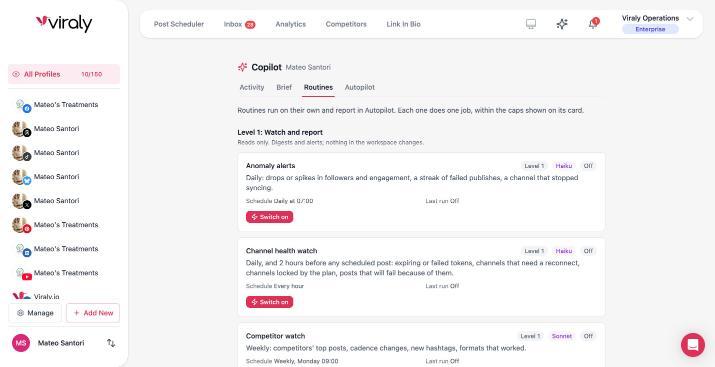
Switch on the Weekly performance digest in a client's set and every Monday it compares the last 7 days with the 7 before, with the top and worst posts and one suggestion each. The Monthly report adds a narrative per channel and per category to the analytics export on the first of the month.
Both routines run per client set, so Juniper Dental's digest never mixes with Harbor Coffee's. They land in the app, in the assistant's own section and in the bell, and not by email yet, so you read them first and decide what the client sees.
Each of these two routines has its own switch, shows its schedule and last run, and only reads. Nothing in a client's workspace changes because a report was written.
The assistant
The assistant, on every client
The assistant works on the social set you have open, so one agency account gets an assistant per client with no extra setup. Here are four things an agency asks it on a normal Monday, and what happens after each one.
“What did our best post do this week?”
Reads at onceWith Juniper Dental's set open, it reads that client's numbers only and answers with the posts it looked at. Nothing in the workspace changes.
“What is still waiting for approval?”
Reads at onceIt lists the pending posts in this set, so you know who to chase before the client's Monday call.
“Which comments need a reply? Draft answers for the questions.”
Sending always asksIt finds the comments without a reply and drafts an answer for each question. A person on your team sends every one, because sending always asks.
“Put the three new drafts in next week's free slots.”
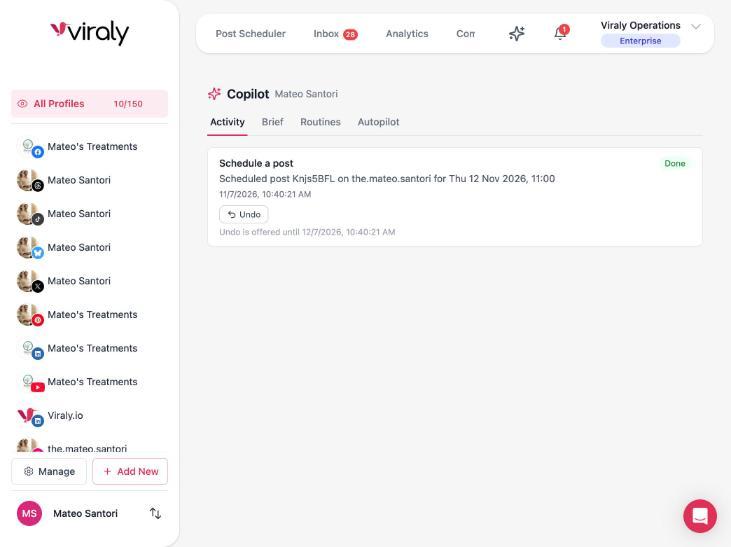
Shows a card firstIt finds the gaps in this client's queue and proposes a slot for each draft. One card, one confirm, and each change sits in the Activity log with Undo for 30 days.
Routines you switch on per client set
- Weekly performance digest: every Monday, the client's last 7 days against the 7 before, with the top and worst posts and one suggestion each.
- Monthly report: on the first of the month, the client's analytics export with a short narrative per channel and per category.
- Inbox triage: labels, priority and an assignee on each new conversation in the client's inbox, by rules you set, and it never replies.
- Suggested replies: a reply drafted as an internal note on the client's questions and leads, which your team reads and sends.
A brief per client
Each set has its own brief where you describe the client's voice, what to avoid and the house rules, and the assistant reads it before every answer. A set's own brief wins over the workspace's, so the dentist never sounds like the coffee roaster.
An Activity log for every set
Every change the assistant made in a set is in the Activity log with who asked, what changed and an Undo button that stays for 30 days. The workspace owner also has one switch that turns the assistant off for everyone.
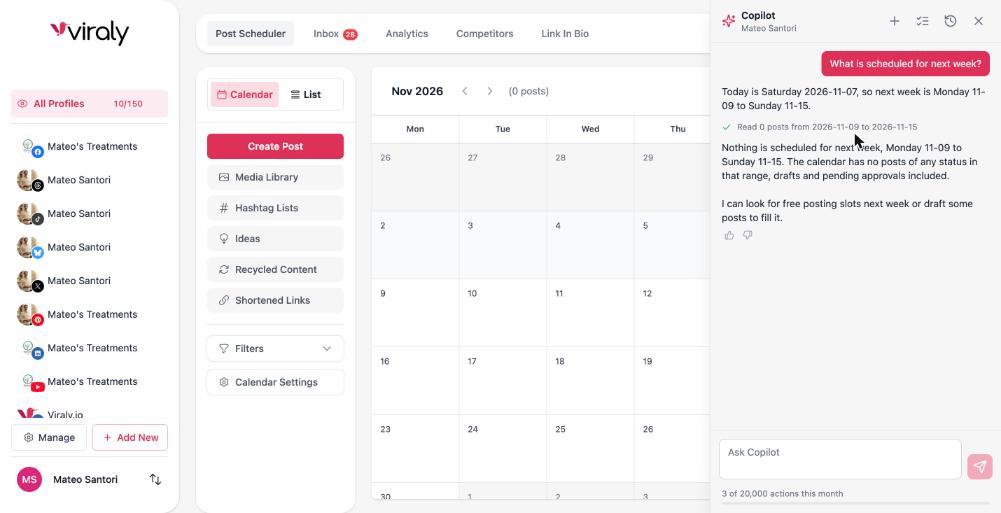
The assistant is included on every plan, with a monthly number of actions that grows as you move up, and the meter at the bottom of the panel shows what is left this month.
11
networks under one assistant
200+
things it can do across posts, inbox, analytics and bio pages
1 card
before every change to your workspace
30 days
of Undo on drafts and settings
Activity
a log of who asked, what changed, and Undo
Off
a switch for every routine, and one for the whole workspace
Questions agencies ask about white label and approvals
Each answer is short, in plain words, and true of the product today.
What is white label social media management?
White label social media management is a scheduler, inbox and reporting tool that an agency runs under its own logo, colors and name, so clients see the agency's brand and not the vendor's. In Viraly it is an Enterprise feature that covers the app, the emails it sends, the PDF reports and the sign-in domain.
What is white label marketing?
White label marketing is work an agency sells under its own brand while a vendor supplies the product or the service behind it. In social media marketing, the agency keeps the client relationship and the strategy, and Viraly supplies the scheduler, inbox, analytics and reports, carrying the agency's logo, colors and name on Enterprise.
How do I set up a social media approval workflow?
Create a social set per client, invite the people who sign off, and connect Slack, Microsoft Teams or Discord if that is where they read messages. From then on a member marks a post for approval, the approver gets Approve and Reject buttons, and comments on the post carry the changes. Approvals come with Business and up.
How do you reduce social media approval bottlenecks in an agency?
Send the approval where the approver already looks, keep comments on the post so changes do not travel by email, and ask the assistant each morning what is still waiting in each set. Viraly does not send approval reminders yet, so a shared chat channel your client already reads is the best place for the Approve button.
What is the best social media management tool for agencies?
The best one runs every client from one account, gives clients a role that approves but cannot edit, puts your brand on the app and reports, and hands repeat work to an assistant that shows a card before every change. Viraly does all four: social sets, the Client role, white label on Enterprise and an assistant on every plan.
How do agencies manage social media accounts for multiple clients?
In Viraly each client is a social set. The client's channels, calendar, inbox, analytics, bio pages and assistant live inside it, and a member sees only the sets you assign. Social sets are unlimited on every plan, so the plan you need depends on how many social profiles you connect and how many people work in the account.
What should be in a social media approval matrix?
It should name who drafts, who reviews inside the agency, who signs off on the client side and where each decision happens. In Viraly that maps to Members who draft and request approval, the Owner who holds the workspace, and on Enterprise a Client role that approves or rejects from the app, Slack, Teams or Discord.
Does Viraly offer white label social media reporting?
Yes. PDF analytics reports come with Business and up, and on Enterprise the white label version carries your logo, colors and brand name instead of Viraly's. CSV exports start at Influencer. The weekly performance digest and the monthly report routines write the summary inside the app, and you decide what the client sees.
What reaches an AI model, and what does not
Prompts carry only the social set you are working in and your brief. Access tokens never enter a prompt. Comments and messages are treated as data, never as instructions. Nothing is used to train models.
Set up your first client set.
Start free, create a social set for one client, connect their channels and ask the assistant what their best post did this week. Approvals come with Business, and white label and the Client role come with Enterprise, when you are ready for them.