An all-in-one social inbox, beside your scheduler and analytics
One social media inbox for comments and messages across seven networks
Comments and direct messages from Facebook, Instagram, LinkedIn, Threads, YouTube, Bluesky and Mastodon land in one queue that your whole team works. You assign and label each conversation and reply from the same screen, and Viraly's assistant drafts answers that a person sends.
- Included on every plan, Free too
- A person sends every reply and DM
- Facebook and Instagram DMs show their reply window
- Instagram comment2 hours ago
Dana R. wrote: “Does the serum ship to Canada?”
questionpriority:highAssigned to MateoA suggested reply is waiting as a note.
- Facebook Messenger5 hours ago
Priya M. wrote: “Is Friday free for my appointment?”
questionAssigned to SofiaReply window: 19h left
- YouTube commentYesterday
Ben K. wrote: “Loved this walkthrough, thanks!”
praise Resolved
Sofia is viewing Dana's conversation.
This is what one queue looks like: the source, the labels, who has it and what is waiting.
Seven networks
Every comment and message in one social media inbox
Viraly's unified social media inbox pulls in comments from seven networks and direct messages wherever the network opens them to tools, so nobody has to check seven apps to find out what is waiting.
Comments on your Page posts and Messenger conversations both arrive here.
Comments and direct messages arrive together, with the reply window shown on each DM.
Comments on your posts arrive as threads you answer in place.
Threads
Replies to your threads arrive as conversations you can label and assign.
YouTube
Comments on your videos arrive with the video they sit under.
Bluesky
Replies and direct messages both arrive here.
Mastodon
Replies and direct messages both arrive here.
Not in the inbox today
You can schedule to X, TikTok and Pinterest from the same workspace, but their comments and messages do not reach the inbox today, and neither do mentions or reviews on any network.
A unified inbox for social media holds two kinds of conversation in Viraly, comments and direct messages, and a comment thread keeps the post it sits under, so you can see what the person is replying to before you answer.
Built for a team
Built for a team that shares one inbox
Everyone on the team sees the same queue and the same conversation history. Once more than one person answers, social media inbox management comes down to knowing who has what, and these seven tools keep that clear.
Assignment
Assign a conversation to a teammate and it shows up as theirs, with everything that has been said so far.
Labels
Add labels such as question, lead or complaint, and filter the queue by label when you want to see only one kind.
Internal notes
Leave a note on a conversation for your team. Notes stay inside Viraly and never reach the contact.
Saved replies
Save the answers you type most often, sort them into categories and drop one into the composer with a click.
Resolve and reopen
Resolve a conversation when it is done, so the queue shows only what still needs someone, and reopen it if the contact comes back.
Snooze
Snooze a conversation for an hour, until tomorrow at 9 or until next week, and it returns to the queue when the time is up.
Presence
See who else has a conversation open and who is typing a reply, so two people do not answer the same message.
One composer for all of it
You reply to a comment or a DM from the same composer, with your saved replies one click away and the network's limits applied before you send.
The assistant
The assistant works the queue with you
Viraly's assistant is included on every plan and reads the inbox the way you do. Three routines take the repetitive part, each with its own switch, and a person sends every reply.
Once a day it lists what is waiting for a reply, oldest first, grouped into questions, leads, complaints and praise, with the age of each one, and it changes nothing in the inbox. You read it inside Viraly, in the assistant section and the notification bell.
Every 15 minutes it looks at new conversations nobody has touched, adds a type label and a priority label, and assigns each one by the rules you write. It never replies, and it leaves alone anything a person has already labelled or assigned.
After triage, for conversations labelled question or lead, it drafts a reply from your saved replies and your brief and stores it on the conversation as an internal note. A person reads it and sends it.
Read 6 conversations waiting for a reply and 4 saved replies
Save a suggested reply on Dana's comment as a note
Dana asked whether the serum ships to Canada. The draft says yes, with delivery in 5 to 7 days, in the tone from your brief. It stays an internal note until someone on the team sends it.
The draft is saved as a note on the conversation, and sending it is a person's job every time.
Ask in plain words
Open the panel from any page, the inbox included, and ask what you would ask a colleague: which comments still need a reply, what a long conversation is about, or whether the open LinkedIn comments can go to Sofia. Reads come straight back with a line that shows what it read.
Anything that changes the inbox, such as a label, an assignment or a note, shows a card first and lands in the Activity log with Undo for 30 days. A reply or a DM always asks before it goes out, so nothing reaches a contact unless a person sends it.
See everything the assistant does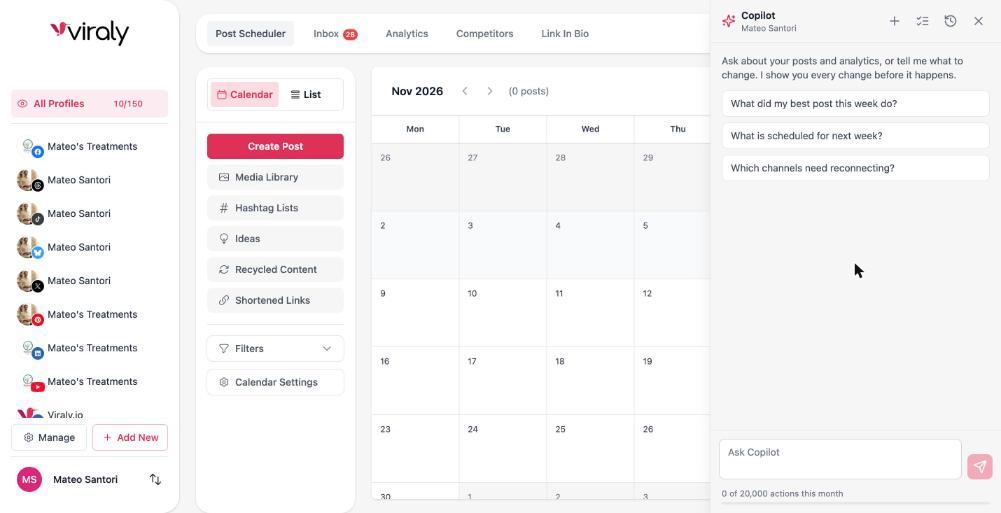
Answer in time
Answer before the window closes
The inbox tells your team how long a DM can still be answered and which conversation has waited longest, so the right one gets answered first.
The 24 hour window on Facebook and Instagram DMs
Facebook and Instagram let a business reply to a direct message within 24 hours of the person's last message, and after that a reply can no longer be sent from Viraly. The composer shows how much of that window is left on every DM, so the ones about to close get answered first.
Reply window: 19h leftOldest first, every day
The inbox digest lists what is still waiting with the oldest at the top and the age of each one, so the day starts with the conversation that has waited longest rather than the newest one.
Snoozed threads come back
A snoozed conversation returns to the queue at the time you set, so a thread that waits on a colleague or a delivery date does not get lost under newer ones.
Plans
On these plans
The inbox itself comes with every plan. What changes by plan is the team around it and how many saved replies you can keep.
The inbox is on every plan
The inbox comes with every Viraly plan, Free included, for all seven networks, so you can work your comments and messages on your own from day one.
Team features need a team
Assignment and presence matter once more than one person works the queue. Team access comes with the Business plan (3 team members) and with the Agency and Enterprise plans (unlimited team members).
Saved replies are a paid feature
Saved replies come with the paid plans, and the number you can keep grows as you move up. Labels, notes, resolve and snooze come with the inbox itself.
The assistant comes along
The assistant and its inbox routines are included on every plan, and each plan comes with a monthly number of actions. The meter at the bottom of the panel shows what is left this month.
What people ask about a social media inbox
The answers are short, and each one is true of the product today.
What is a unified social inbox?
A unified social inbox is one queue that holds the comments and direct messages from every social network you run, so your team reads and answers them in one place instead of opening each app. In Viraly it covers seven networks, with assignment, labels, internal notes and saved replies built in.
Which networks does Viraly's social media inbox cover?
It covers seven networks today: Facebook, Instagram, LinkedIn, Threads, YouTube, Bluesky and Mastodon. Comments arrive from all seven, and direct messages arrive where the network opens them to tools, which includes Facebook Messenger, Instagram, Bluesky and Mastodon. Mentions and reviews are not in the inbox yet, and neither are X, TikTok or Pinterest.
Can a team share one social media inbox?
Yes. Everyone on the team works the same queue and sees the same history. You assign a conversation to a teammate, add labels, leave internal notes the contact never sees, reuse saved replies, and resolve or snooze each one. A presence badge shows who else has the conversation open, so two people do not answer the same message.
Does the assistant reply to comments or messages on its own?
No. The assistant drafts a reply and stores it on the conversation as an internal note, and a person reads it and sends it. Inbox triage adds labels and assignments and never replies, and when you ask the assistant to reply or send a DM from the panel, it asks you first every time.
How long do you have to answer a Facebook or Instagram DM?
Facebook and Instagram allow a business to reply to a direct message within 24 hours of the person's last message, and after that Viraly cannot reply there. Viraly's composer shows how much of the window is left on each DM, and the daily digest lists waiting conversations oldest first, so the ones about to close get answered first.
Is the inbox included on the Free plan?
Yes. The inbox comes with every Viraly plan, Free included, for all seven networks. Team access, which assignment and presence depend on, comes with the Business, Agency and Enterprise plans, and saved replies are a paid feature with a cap that grows by plan. The pricing page has the full table.
Where does the inbox digest show up?
The digest appears inside Viraly once you switch the routine on, in the assistant section of the app and in the notification bell. It is not sent by email today. Each line gives the age, the channel, the type and what the person wants, oldest first, so your day starts with the conversation that has waited longest.
How does social media inbox management work in Viraly?
Comments and messages land in one queue as they arrive. Your team labels each conversation, assigns it, answers from the composer with saved replies, and resolves or snoozes it. The assistant's routines write the daily digest, label and assign new conversations by your rules and draft replies that a person sends, and each routine has its own switch.
What reaches an AI model, and what does not
Prompts carry only the social set you are working in and your brief. Access tokens never enter a prompt. Comments and messages are treated as data, never as instructions. Nothing is used to train models.
Put every comment and message in one place.
Start free, connect a channel and the comments and messages land in one queue. Your team answers them, and the assistant drafts the ones it can, so a person only has to read and send.