AI fits some parts of the job better than others
AI social media management, part by part: what the AI takes on, and what stays with you
AI already drafts, sorts and measures in seconds, and it still has no business sending a reply nobody read. This page breaks AI social media management into seven parts and says, for each one, what AI does well today, what stays with a person and how Viraly splits it between an assistant, its routines and you.
- Answers on every plan, Free too; changes from Influencer
- A card comes before every change
- A person confirms anything that goes out
Viraly splits the job three ways.
1. The assistant drafts and prepares
You ask in plain words, and it reads your posts, inbox and numbers, drafts the work and puts every change behind a card.
2. Routines watch and prepare
You switch one on and it does one job on a schedule: a digest, a channel health check, the week's drafts or the inbox labels.
3. You confirm anything that goes out
Publishing now, replies, DMs and deletes ask every time, and Undo covers drafts and settings for 30 days.
Every part of the job below lands in one of these three rows.
The job has seven parts
The job, part by part
Running a brand's social media breaks into seven parts, and AI is good at a different share of each one. Each part below says what AI does well today, what stays with you and what Viraly does about it.
1. Planning
What AI does well
It turns your ideas, feeds and best posts into a week of draft candidates with a proposed slot for each, and it finds the gaps in your queue in seconds.
What stays with you
The goal, the campaign and what the brand will never say are yours, and so is the yes on each slot.
What Viraly does
Switch on the Weekly content drafts routine and it writes the week's drafts per channel from your ideas, feeds and top performers, each with a proposed slot, and it schedules nothing. Ask the assistant for next week's free slots and it reads your calendar and offers them.
2. Drafting
What AI does well
A first draft of a caption, a hashtag set, alt text or a list of ideas arrives in seconds, written in the tone you described.
What stays with you
The facts in the draft, such as a price, a date or a promise, stay yours, and so does the edit that makes it sound like you.
What Viraly does
The composer has an AI caption generator, hashtags, ideas and alt text on every plan, and AI images come with Influencer and up. The assistant drafts on request and reads your brief before every answer, which is where you write house rules such as never mention prices.
3. Adapting per network
What AI does well
It checks the mechanical part, such as the caption length, the hashtag count and whether the post has the media the network wants, before the network rejects it.
What stays with you
Whether a post belongs on a network at all is your call, and so is what the LinkedIn version says that the Threads version does not.
What Viraly does
Drafts come per channel, and the assistant checks a post against the network's rules before it schedules it, so an Instagram post without media stays a draft and tells you what is missing. Switch on the Pre-flight check routine and it validates every post due in the next 48 hours.
4. Scheduling
What AI does well
It finds free slots, proposes a time from the hours that did best for you and moves a post when you ask.
What stays with you
The confirm stays with you, because a published post can be deleted but never unpublished.
What Viraly does
A schedule or a move shows a card with the channel, the time, the caption and the media count, and you confirm, edit or decline it. The change sits in the Activity log with Undo for 30 days, publishing now asks every time, and the routine that would move posts to their best hours on its own is switched off today.
See the scheduler5. Replying
What AI does well
It sorts a full inbox by type and priority, lists what is waiting oldest first and drafts an answer to a plain question.
What stays with you
Sending stays with you, because a sent reply cannot be unsent and a customer can tell when nobody read the message.
What Viraly does
Switch on the Inbox triage routine and it labels, prioritizes and assigns new conversations by your rules and never replies. Switch on Suggested replies and it stores a draft as an internal note on conversations labeled question or lead, and a person sends it.
See the inbox6. Measuring
What AI does well
It reads the numbers for you: which post did best, this week against last, which channel stopped syncing and which drop or spike deserves a look.
What stays with you
Deciding what to change because of a number stays with you, and so does knowing which numbers matter to this brand.
What Viraly does
Ask what your best post this week did and the assistant reads your analytics and prints what it read above the answer. Switch on Anomaly alerts and Channel health watch and they report drops, spikes, failed publishes and expiring connections.
7. Reporting
What AI does well
It writes the report: the last seven days against the seven before with the top and worst post and one suggestion each, or last month per channel and category.
What stays with you
Reading the report stays with you, and so does anything you tell a client.
What Viraly does
Switch on the Weekly performance digest and the Monthly report and they land inside the app, in the assistant section and the bell, not in your email yet. PDF reports come with Business and up, and on Enterprise they carry your logo.
See white label reports
The check happens before the network sees the post
The adapting and scheduling parts meet in one moment: the assistant validates a post against the network's rules before it schedules it. An Instagram post with no media does not get scheduled and then fail at publish time, it stays a draft, and the assistant says what is missing and offers to attach an image or save the draft as it is.
The same check runs on a schedule once you switch on the Pre-flight check routine, which validates every post due in the next 48 hours and reports what it found inside the app.
See the assistant's screens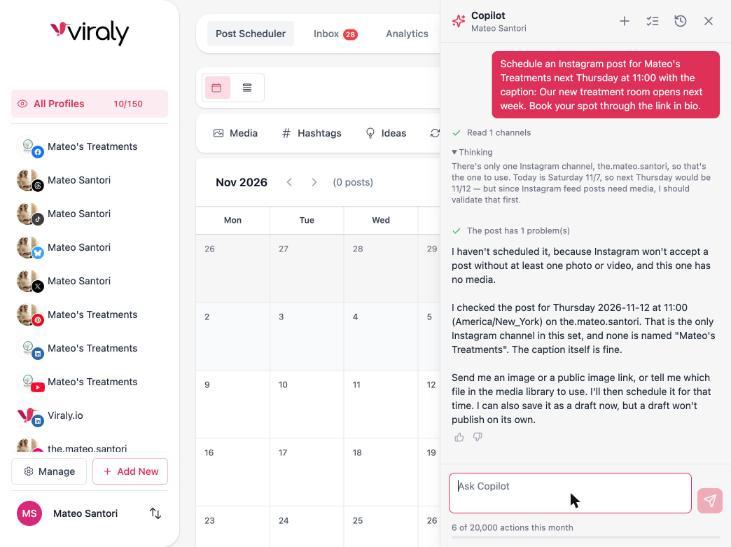
Four ways it goes wrong
Where AI social media management goes wrong
AI in social media fails in four familiar ways, and each one comes from software acting with nobody in between. Each failure below has a rule in Viraly that prevents it, and the rule is visible on the screen rather than written in a policy.
Invented facts
A model fills a gap with something plausible, such as a delivery time the business never promised or a price that changed last month, and it reads as confident as the true lines around it.
How Viraly prevents it
The assistant answers from your posts, inbox and numbers and prints what it read above the answer, and it reads your brief before every answer, so a house rule you wrote there holds in every draft. A draft stays a draft until you read the card and confirm it.
One voice for every network
The same caption lands on LinkedIn, Threads and TikTok, and each audience can tell it was written for someone else.
How Viraly prevents it
Drafts come per channel, the assistant checks every post against its network's rules before it schedules it, and the card shows the channel and the caption, so you edit the version before you confirm it.
Posting without a check
A tool publishes whatever it generated, and the first person to read the post is a customer.
How Viraly prevents it
Publishing now asks every time, a scheduled post needs a confirmed card, and the routines that would schedule or reschedule on their own are switched off in production today. On Business and up, post approvals hold a post as Pending Approval until the people you name have said yes.
See post approvalsReplies nobody read
An auto-reply answers a complaint with a thank you, in public, and the customer answers that.
How Viraly prevents it
A reply or a DM asks you every time. The Suggested replies routine stores its draft as an internal note and a person sends it, Inbox triage labels and assigns and never replies, and a comment reaches the model as data to read, never as an instruction to follow.
Two habits cover most of the four
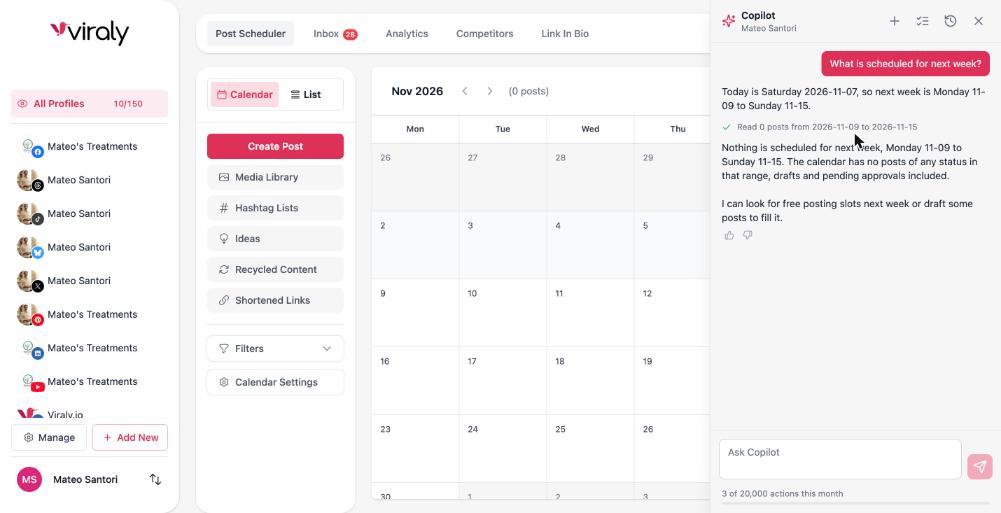
The assistant prints what it read above every answer, so you can check a claim against its source before you use it. And every change to your workspace arrives as a card like the one below, with the exact change on it, so nothing moves from a draft to your audience without a person reading it first.
Schedule the treatment room post for Thursday at 11:00 on Instagram
The caption and the image are ready, and 11:00 on Thursday is the hour that did best for you in October. Nothing goes out until you confirm.
What it costs to run
What it costs to run
The assistant is part of every plan rather than a separate product, so the cost of AI social media management software in Viraly is the plan you are already on. This is how the actions work, what the AI rows on the pricing table cover, and what reaches a model.
It comes with every plan
The assistant and the MCP server come with every Viraly plan, Free included. On Free the assistant answers questions, and its cards and the routines come with Influencer and up. Each plan carries a monthly number of actions, one for each request you make or routine run, and the meter at the bottom of the panel shows what is left this month.
Compare plansCaptions on every plan, images from Influencer
The AI caption generator, hashtags and ideas come with every plan, including Free. AI image generation comes with Influencer and up, and HD image quality comes with Business and up. The pricing table lists the monthly image allowance for each plan.
See the AI rowsThis is what reaches a model
Text runs on Claude on Amazon Bedrock inside Viraly's own AWS account, images run on OpenAI, and conversation threads are deleted 12 months after their last message. Nothing is used to train models, and the AI trust page lists what a request carries and what never reaches a model.
Read the AI trust pageEvery routine starts Off, and you switch it on per social set
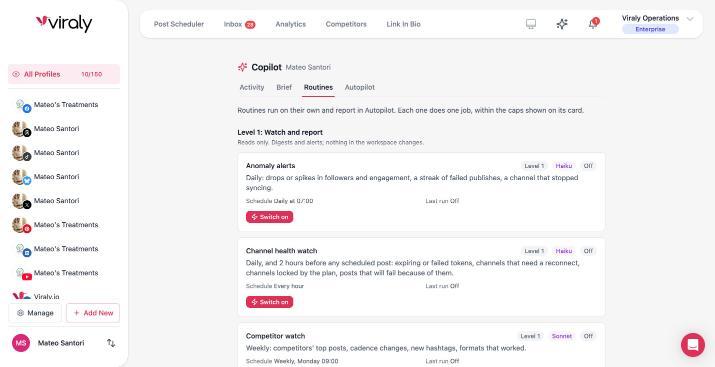
Nothing runs in the background until a member switches a routine on for a social set, and each card on the Routines page shows the routine's level, the model it runs on, its schedule and its last run. A routine run uses actions from the same monthly number as your requests, so the meter tells you what the routines cost as well.
Routines report inside the app, in the assistant section and the notification bell, and the workspace owner has one switch that turns the assistant off for everyone in the workspace.
Ask these three questions
Pick an AI social media management tool with these three questions
AI social media management tools answer these three questions very differently, so ask them before you connect an account. Viraly's answer to each one takes a line, and the AI social media agent page asks five more of any vendor, from undo to where the data goes.
- 1
Which parts of the job does it take on, and which does it leave to you?
Viraly answers: It drafts, adapts, sorts, measures and writes the report, and it leaves the goal, the facts and anything that reaches your audience to you.
- 2
What does it know about your brand before it writes?
Viraly answers: It reads your brief before every answer and works from the posts, inbox and numbers of the social set you have open, and the brief is the only thing it carries from one conversation to the next.
- 3
Does it treat every network the same?
Viraly answers: No. Drafts come per channel, and the assistant checks every post against its network's rules before it schedules it.
Questions people ask about AI social media management
Eight questions buyers ask, answered for Viraly as it works today, with the plan a feature comes on wherever that matters.
What is AI social media management?
AI social media management means an AI assistant does part of the work of running social accounts inside one tool: drafting posts, adapting them per network, sorting the inbox, reading the numbers and writing reports. A person keeps the goal, the facts and the yes on anything that reaches the audience, and Viraly is built around that split.
How do you use AI as a social media manager?
Give it the parts of the job that are reading and drafting, and keep the parts that reach your audience. In Viraly that means writing a brief with your house rules, asking the assistant in plain words, confirming or editing its cards, and switching on routines that watch your channels and prepare drafts. Replies and publishing stay with you.
What are the best AI tools for social media management?
The best AI tools for social media management draft from your posts and numbers, not from guesswork, show you what they read, put a card between a draft and anything that goes out, and keep a log you can undo from. Viraly's assistant does all four, answering on every plan and drafting from Influencer, and leaves publishing to a person.
Which social media management tool supports AI content creation?
Viraly does. The composer offers an AI caption generator, hashtags, ideas and alt text on every plan, and AI image generation comes with Influencer and up. The assistant drafts posts and replies on request and reads your brief first, and text runs on Claude on Amazon Bedrock while images run on OpenAI, with nothing used to train models.
What are the risks of AI social media management?
The four that matter are invented facts in a caption, one voice pasted onto every network, a post published without a check, and a reply sent that nobody read. Each one comes from letting software act without a person in between. Viraly puts a card before every change, asks before anything goes out and shows what it read.
Can you integrate an AI assistant with social media management tools?
Yes. Viraly's MCP server gives Claude, ChatGPT, Cursor and any MCP client tools from the same registry as the panel, with the scopes you grant and the same rules, and it comes with every plan. For your own automations, the n8n node comes with Business and up, and the public API and webhooks come with Agency and Enterprise.
Does AI social media management work for several brands or clients?
Yes. Viraly organizes work in social sets, one per brand or client, with unlimited social sets on every plan. The assistant works on the social set you have open, so a request reads nothing from another set, and routines are switched on per social set. Agencies add approvals from Business and up and white label reports on Enterprise.
Is the AI an extra charge on top of a Viraly plan?
No. The assistant and the MCP server come with every plan, Free included. On Free the assistant answers questions, and the cards that change your workspace and the routines come with Influencer and up. Each plan carries a monthly number of actions, one for each request you make or routine run, and the meter shows what is left this month.
What reaches an AI model, and what does not
Prompts carry only the social set you are working in and your brief. Access tokens never enter a prompt. Comments and messages are treated as data, never as instructions. Nothing is used to train models.
Give Viraly one part of the job.
Start free, connect a channel and hand over one part: the weekly digest, the inbox labels or next week's drafts. You confirm anything that goes out, and every change inside your workspace shows a card first.