A plan for the communications lead with volunteers and a small budget
Social media for nonprofits on a small team and a small budget
You run communications for an organization with more mission than hours, often beside another job and with volunteers who want to help. This page gives you a nonprofit social media strategy in five parts, each with one rule, and shows how Viraly carries it on the Free plan or with 25 percent off every paid plan.
- Registered nonprofits get 25 percent off every paid plan
- The Free plan needs no credit card
- The assistant answers on every plan, Free too; changes from Influencer
Riverside Food Pantry
Groceries for Riverside families every Saturday since 2009.
Get the monthly letter
Tips and donations
A digital business card with a QR code comes with every plan, for the table at the fair.
This is the shape of a bio page a nonprofit might build, with sample text. The donate link and the event come with every plan, and the newsletter form and the donation block start on Influencer.
The plan
A nonprofit social media strategy in five parts
Here's how it works: five parts, one paragraph each, and one rule in each that you can hold the whole team to. The plan assumes a communications lead with a few hours a week, volunteers who help, and two or three networks. Under each part sits the line about how Viraly carries it, with the plan it starts on.
- Part 1 of 5
Goal and audience
Pick one goal for the quarter and one audience to say it to. A food pantry that needs Saturday volunteers writes for the people who live a short drive away, and a legal aid clinic that needs donors writes for the people who gave last year. Everything else on the plan follows from those two choices, so make them first and write them down where the whole team can see them.
The rule: Every post is for one person and asks for one thing, and a post that cannot say who and what waits until it can.
How Viraly carries it
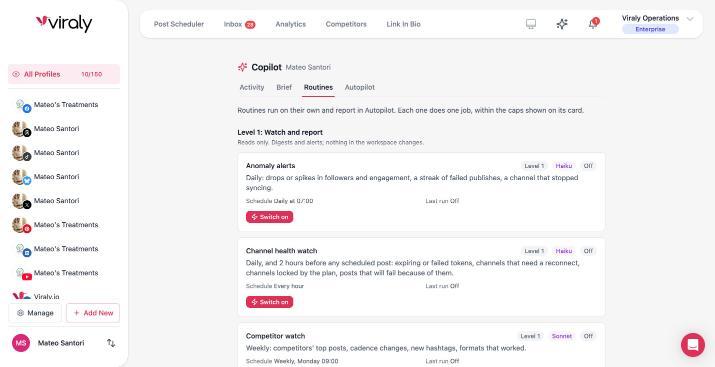
Write the goal, the audience and your house rules into the brief in Viraly. The assistant reads the brief before every answer on every plan, and before every draft it writes for you from Influencer, so a volunteer's draft starts from the same page as yours.
- Part 2 of 5
The stories only you can tell
A nonprofit has what a brand pays for: the family that got its first apartment, and the volunteer who has shown up every Tuesday for nine years. Social media marketing for nonprofits is those stories told plainly, with a photo from the day, and the direct appeal kept for the moments that need it. Ask for consent in writing before a person's story goes up, and let them withdraw it at any time.
The rule: One post carries one person's story and one ask, and the story has that person's written consent.
How Viraly carries it
Keep the stories on an idea board (five boards and fifty ideas on Free, ten boards and 200 ideas on Influencer) and the photos in the media library, both on every plan. From Influencer, ask the assistant to turn an idea into a draft in the voice from your brief, and it shows a card with the caption before anything is saved.
- Part 3 of 5
A cadence a volunteer team can keep
Three posts a week on two networks beats a daily post that stops in March. Set the days, fill the week's queue in one sitting, and let the volunteer who likes writing batch the drafts on a Sunday evening. A quiet week repeats an evergreen post, such as your hours or your volunteer sign-up, instead of going dark, because a page that has gone quiet is the first thing a new supporter notices.
The rule: The calendar is never empty for the next seven days.
How Viraly carries it
The calendar and the queue publish at the times you set across ten social networks, X from Influencer, and the content recycler reposts your evergreen posts on a rhythm you choose, on every plan. Free covers ten posts a month and Influencer 200, and the Viraly WordPress plugin shares each new blog post to your channels on both.
- Part 4 of 5
Who approves what
Volunteers draft and a staff member approves, every time, because a wrong date on an event post or a name used without consent costs more than a day's delay. Write down who may publish without a second reader and keep that list to one or two people. The approver reads for the facts and the consent, checks the tone against the brief, and sends the rest back with a note rather than fixing it quietly.
The rule: Nothing publishes under the organization's name that a staff member has not read.
How Viraly carries it
On the Business plan a volunteer with a Member seat drafts in the social sets you assign and clicks Request Approval, the post waits as Pending Approval on the calendar, and the staff member approves from the app, Slack, Microsoft Teams or Discord. Business includes three team members, and Agency and Enterprise have no limit.
- Part 5 of 5
What to measure for the board
The board does not need impressions, it needs three numbers that connect to the mission: how many people saw the volunteer call, how many clicked the donate link, and how the audience grew since last quarter, with the sign-ups from your own sheet beside them. Pick those three, write them the same way each month, and add a one-line note on what you changed and what you will try next.
The rule: One page, the same three numbers, every month, with last month beside them.
How Viraly carries it
Post, channel and campaign analytics come with every plan, and the tools below carry the history and the exports by plan. From Influencer, the bio page's own analytics count the clicks on the donate link, and the Weekly performance digest and Monthly report routines, once switched on, write the comparison and the monthly narrative inside the app.
People who saw the volunteer call
3,400 views2,900 last monthViraly analytics, every plan
Clicks on the donate link
212 clicks148 last monthBio page analytics, from Influencer
New followers on both channels
+86+41 last monthViraly analytics, every plan
Saturday volunteer sign-ups
2719 last monthYour own sign-up sheet
The numbers are samples. Three rows come from Viraly and the fourth comes from the organization's own sheet, which is how a board page should read.
The tools
Social media for nonprofits needs five tools, not a department
Lists of social media management tools for nonprofits run long, and an organization like yours needs five parts of one tool. In Viraly they come down to these, each with its own page for the detail and the plan it starts on.
A scheduler for ten networks
One calendar holds Instagram, Facebook, LinkedIn, TikTok, YouTube, Pinterest, Threads, Bluesky, Mastodon and X, with a queue that publishes at set times, drafts for half-finished stories, hashtag lists, a media library and the holidays already on the calendar, so the seasonal post is planned a month out. The content recycler keeps the evergreen posts going, and a social media scheduler for nonprofits has to do that much and no more.
On these plans. It comes with every plan, with ten posts a month on Free and 200 on Influencer, and X scheduling starts on Influencer.
See the scheduler for Instagram, Facebook, LinkedIn, TikTok, X, YouTube, Pinterest, Threads, Bluesky or Mastodon.
One inbox for the questions
Comments from Facebook, Instagram, LinkedIn, Threads, YouTube, Bluesky and Mastodon and direct messages from Facebook Messenger, Instagram, Bluesky and Mastodon land in one queue. A supporter asking where to drop off coats gets an answer from the same screen, with a label, an internal note and a snooze for the thread that waits on the warehouse volunteer.
On these plans. It comes with every plan, Free included. Assignment to a volunteer and the presence badge come with team access on Business and up, and saved replies are a paid feature.
A bio page with the donate link
Most networks allow one link, so the page behind it carries the donate button to your donation page, this month's event, the newsletter form and your social icons. From Influencer the page collects emails, exportable as a CSV or sent to Mailchimp, Brevo and the other email tools Viraly connects to, and a tip and donation block holds links to PayPal, Venmo, Cash App and the like. The digital business card with its QR code goes on the table at the fair.
On these plans. Free includes one page with five custom links. Influencer includes five pages, 25 links, a custom URL, email collection, page analytics and five donation methods, and Business adds ten methods and a custom domain.
Analytics the board will read
Post, channel and campaign numbers sit at three levels, so the spring appeal that ran on Facebook and Instagram gets one total instead of two tabs. Export a CSV for the spreadsheet the treasurer keeps or a PDF report the board reads as it is, and the free engagement rate calculator compares one post against your own average.
On these plans. It comes with every plan, with two weeks of history on Free, six months on Influencer and twelve on Business. CSV export starts on Influencer and PDF reports on Business.
Approvals for volunteers
The post waits as Pending Approval until the staff member you named clicks Approve, and the post then shows who decided and what they said. Comments stay on the post, so the correction to the event date lives next to the post rather than in a text thread, and a rejection returns it to Draft for the volunteer to fix and ask again.
On these plans. It comes with Business, with three team members, permissions per person and social sets assigned to each, and Agency and Enterprise have unlimited team members.
What a nonprofit can leave for later
Competitor benchmarking on Business and up, the public API and webhooks on Agency and Enterprise, and white label on Enterprise can all wait until the work asks for them. A second chapter or program gets its own social set, with its own calendar and channels, on every plan, and the software page shows which plan carries each part when that day comes.
See every part of the softwareThe budget
25 percent off, and which plan fits
Registered nonprofits get 25 percent off every paid Viraly plan, monthly or annual, and the Free plan costs nothing and needs no credit card. Here is which plan fits which organization, in words, and the pricing page has the numbers.
To apply, write to Viraly from your organization's official email address, give its name and its website or social media presence, and the Viraly team verifies the status and applies the discount to a new or an existing subscription, monthly or annual. The non-profit discount page below has the steps in full.
Free
For one person trying the plan, at no cost and with no credit card.
What it includes
- Three social profiles and ten posts a month.
- Scheduling on nine social networks plus WordPress, with the calendar, the queue, drafts, hashtag lists, the media library and the content recycler. X starts on Influencer.
- The inbox for seven networks, with labels, notes and snooze.
- Post, channel and campaign analytics with two weeks of history.
- One bio page with five custom links, a media grid and a digital business card with a QR code.
- The assistant for questions, the MCP server, AI captions and five idea boards.
The discount does not apply here, because there is nothing to pay.
Influencer
For the communications lead who runs it alone, with 25 percent off.
What it includes
- Five social profiles and 200 posts a month on all ten networks.
- Six months of analytics history and CSV export.
- Five bio pages with a custom URL, email collection, page analytics and five tip and donation methods.
- The assistant's drafts, schedules and inbox labels, each behind a card you confirm, with Undo for 30 days; a reply it drafts is sent by you.
- The Level 1 and Level 2 routines, switched on per social set: the weekly digest, the monthly report, the inbox digest, inbox triage, suggested replies and the week's drafts.
- AI image generation, twenty images a month.
Business
For the team where volunteers draft and a staff member approves, with 25 percent off.
What it includes
- Fifteen social profiles and 500 posts a month.
- Three team members, permissions per person and social sets assigned to each.
- Post approvals and team comments on posts, with Slack, Microsoft Teams and Discord for the Approve button.
- Twelve months of analytics history, PDF reports and competitor benchmarking for five accounts.
- Fifteen bio pages with a custom domain and ten tip and donation methods.
- Priority support.
Agency and Enterprise add unlimited team members, the public API and webhooks, and Enterprise adds white label, and the discount applies to those plans in the same way. An organization that already pays for Viraly applies with the same three steps.
The assistant
Ask Viraly to do the typing
The assistant answers questions on every plan, Free too, and from Influencer it drafts, schedules and sorts the inbox behind a card you confirm. Here are three asks a nonprofit would type, and what happens after each one.
Ask 1
It works on every plan, Free too.
“What did the volunteer call on Facebook do this week, compared with last month's volunteer call?”
It reads both posts and answers with their numbers and a line that says what it read. A question is a read, so nothing changes and no card appears.
Ask 2
Drafting starts on Influencer, and approvals come with Business.
“Draft a post for Instagram from the idea called Maria, nine years of Tuesdays, in the voice from our brief, and send it to Priya for approval.”
It reads the idea board and your brief, writes the caption and shows a card with the draft. On Business a second card requests Priya's approval, and the post waits as Pending Approval until she clicks Approve.
Ask 3
It starts on Influencer.
“Find the free slots next week and schedule the coat drive reminder for Monday at 9.”
It reads the queue, checks the post against the network's rules and proposes the card shown here. Confirm, and the post sits on the calendar and in the Activity log with Undo for 30 days.
From Influencer, two routines take the repeating work off the week. Switch on the Inbox triage routine and every 15 minutes it labels new conversations question, lead or complaint by the rules you write, and on Business it assigns each one to a volunteer; it never replies. Switch on the Weekly performance digest routine and every Monday the comparison for the board is waiting inside the app.
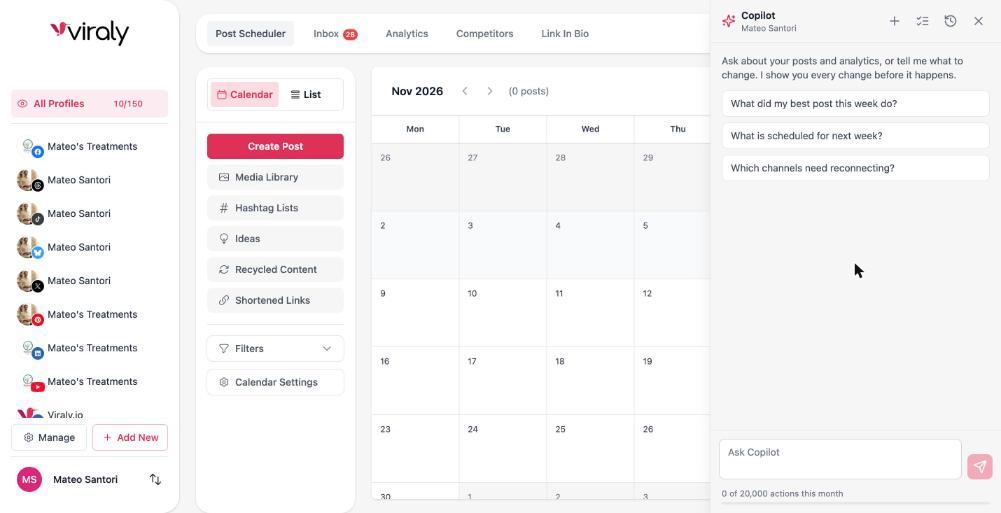
Read 1 draft and 8 empty posting slots from 16 to 22 November
Schedule the coat drive reminder for Monday at 9:00 on Facebook
The caption is the draft Sam wrote on Sunday, with the photo of the sorting table from your media library. Monday 9:00 is a free slot in your queue. It publishes by itself at that time.
Nothing is scheduled until you confirm, and the card shows the channel, the time and the caption before you do.
The assistant does not publish, reply or send a message on its own, and the routines that would act outward are switched off today. The same asks work from Claude or ChatGPT through the MCP server, on every plan, within the same plan limits, and over MCP there is no Viraly card, so your AI client is the one that asks before anything goes out.
What nonprofits ask about social media
Each answer rests on a plan limit, a step in the five-part plan or the terms of the discount, and the pricing page and the non-profit discount page carry the figures behind them.
How should a nonprofit use social media?
Pick one goal and one audience, tell the stories only your organization can tell, keep a cadence a volunteer team can hold, have a staff member read every post before it publishes, and report three numbers to the board each month. Viraly carries that plan from its Free plan, with 25 percent off the paid plans for registered nonprofits.
Which social media platforms should a nonprofit be on?
Be where your supporters already are. For a community organization that often means Facebook and Instagram, with LinkedIn added when corporate donors or partners matter. Two or three networks posted to every week beat six that go quiet, and Viraly schedules to ten social networks, so a third one can be added later without a new tool.
How often should a nonprofit post on social media?
Two or three posts a week is a cadence a small team can hold, and keeping it matters more than the count. Fill the week's queue in one sitting and let an evergreen post about your hours or your volunteer sign-up repeat in a quiet week. Viraly's Free plan covers ten posts a month and Influencer 200.
How do you use social media for nonprofit fundraising?
Put the donate link where every network sends people, the one link in your bio, and tell one supporter's story per appeal. Viraly's bio page carries the link to your donation page on every plan, and from Influencer it adds a tip and donation block with PayPal, Venmo and Cash App links and a newsletter form.
Is there a free social media scheduler for nonprofits?
Yes. Viraly's Free plan schedules to nine social networks plus WordPress for three social profiles and ten posts a month, with the calendar, the media library, the inbox for seven networks, analytics with two weeks of history and one bio page, and it needs no credit card. X scheduling and the 25 percent discount start with the paid plans.
Does Viraly offer a nonprofit discount?
Yes. Registered nonprofits, charities and NGOs get 25 percent off every paid Viraly plan, monthly or annual. Write to Viraly from your organization's official email address, give its name and its website or social media presence, and the Viraly team verifies the status and applies the discount to a new or an existing subscription.
Can volunteers draft social media posts without publishing them?
Yes. On Viraly's Business plan a volunteer with a Member seat drafts in the social sets assigned to them and clicks Request Approval, the post waits as Pending Approval on the calendar, and nothing publishes until the staff member named as approver clicks Approve in the app, Slack, Microsoft Teams or Discord. Business includes three team members.
Why is social media important for nonprofits?
Your supporters and the people you serve already spend time there, so a story posted on Tuesday reaches them without a mailing budget, and a question about Saturday's event gets answered where it was asked. The work gets seen as long as the posting keeps going, which is what a plan and a scheduler are for.
What reaches an AI model, and what does not
Prompts carry only the social set you are working in and your brief. Access tokens never enter a prompt. Comments and messages are treated as data, never as instructions. Nothing is used to train models.
Put the first week on the calendar.
Start free, connect the two or three channels your supporters use, and ask the assistant what is scheduled for next week. When volunteers join, the Business plan brings approvals, and the 25 percent discount starts with a note from your organization's email address.