A plan for the owner or a team of one
Social media management for small business that fits in two hours a week
You run the business, so social media gets the hours that are left, and the plan has to fit them. This page lays out a weekly rhythm of three short sessions and shows how Viraly's Free and Influencer plans carry it, with an assistant that answers from your numbers on Free and, from Influencer, drafts the posts, schedules them into free slots and sorts the inbox behind a card you approve.
- The Free plan needs no credit card
- The assistant answers on every plan; changes from Influencer
- A card shows before every change
- MonPlan the week and draft the postsThe assistant drafts from your ideas and your brief, you add the photos, and you confirm one card per post.60 min
- WedAnswer what came backComments and messages from seven networks wait in one inbox, and the assistant drafts the replies you send.30 min
- FriRead the numbers and pick one changeAsk what your best post did, see which channel grew, and decide one thing to do differently next week.30 min
Two hours in all, and the queue keeps publishing on the days in between.
This is the rhythm the page walks through, with the time each session takes once the assistant does the typing.
The weekly rhythm
A week of social media in two hours
Here's how it works: three sittings on three days, each with one job, and the assistant doing the typing in each. It is a social media marketing plan at its smallest, and the times assume three channels, two or three posts a week, photos you already have and comments in the tens rather than the hundreds. The routines named in each step start on Influencer, and the Free plan carries the rhythm without them.
- Monday About an hour
Plan the week and draft the posts
What you do
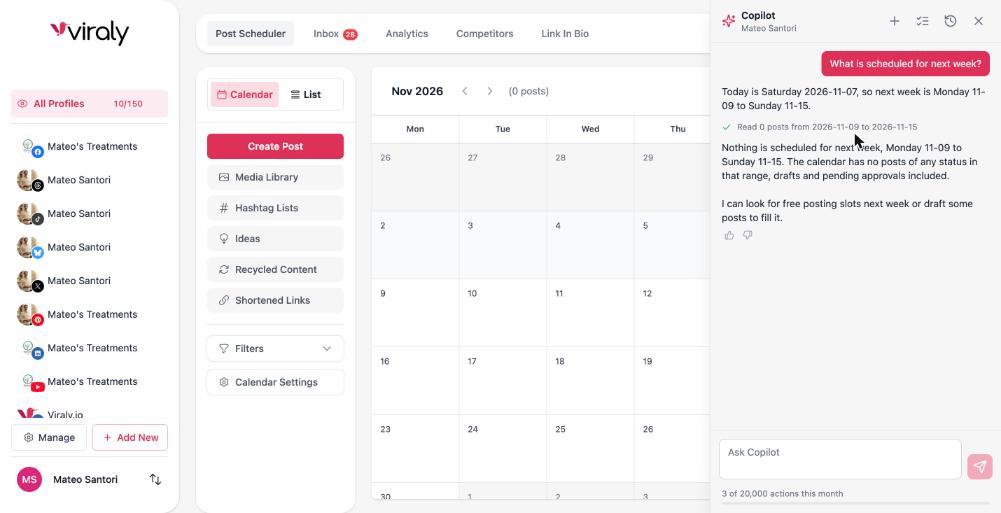
Open your social set and ask the assistant what is scheduled for next week. It reads the calendar and answers with a line that says what it read. Then pick two or three topics from your idea board, with the holidays already on the calendar so the seasonal post is not a surprise, and ask for a draft of each one in the voice from your brief.
What Viraly does
It writes a caption per topic and shows a card for each draft. You add the photos from your phone through the media library, then ask it to find the free slots and schedule the drafts, and it shows one card per post with the channel, the time and the caption. It checks each post against the network's rules first, so an Instagram post with no photo is caught in the panel rather than at publish time.
Where the time goes
Ten minutes go to choosing the topics, twenty to reading and editing the drafts, twenty to adding photos and ten to confirming the cards. Switch on the Weekly content drafts routine and the drafts are waiting when you sit down, each with a proposed slot, which takes most of the drafting time off the hour.
- Wednesday About half an hour
Answer what came back
What you do
Open the inbox. Comments from seven networks and the direct messages from Facebook Messenger, Instagram, Bluesky and Mastodon wait in one queue, and each comment keeps the post it sits under. Answer the questions first, because a question about your hours or a price is a sale waiting, and get to the thanks after that.
What Viraly does
Ask which comments still need a reply and it lists them. Ask for a draft on the one about gluten-free loaves and it writes one from your brief and saves it as a note on the conversation, and you send it. Facebook and Instagram DMs show how much of their 24 hour reply window is left, so those come first. Switch on the Inbox digest routine and each morning it lists what is waiting, oldest first, inside the app.
Where the time goes
Half an hour covers comments that arrive in the tens each week. On a quiet week this session is ten minutes, and a complaint is still yours to write, with the draft as a starting point.
- Friday About half an hour
Read the numbers and pick one change
What you do
Open analytics for the week. Every plan shows post, channel and campaign analytics, with two weeks of history on Free and six months on Influencer. Look at two things, which post did best and which channel grew, and pick one change for next week: a format, a posting time or a topic.
What Viraly does
Ask what your best post this week did and the answer comes back with the numbers it read. Switch on the Weekly performance digest routine and every Monday it compares the last seven days with the seven before, names the top and worst post and gives one suggestion for each, inside the app and the notification bell, so Friday becomes a glance. Switch on the Channel health watch routine and an expired connection is flagged before a post fails because of it.
Where the time goes
Half an hour is enough, and less once the digest is on. The free engagement rate calculator is there when you want to compare a post against your own average, with the formula written out in your numbers.
What the two hours assume
- You run three channels, which is what the Free plan includes, and post two or three times a week.
- You already have the photos on your phone or in the media library, since a shoot is its own afternoon.
- Comments and messages arrive in the tens each week rather than the hundreds.
- One person decides, with nobody else to sign off, so there is no approval step.
A launch week or a holiday season takes more, and the fix is a second drafting session on Thursday rather than a hire. If a week goes by with no session at all, the queue keeps publishing what is already scheduled and the content recycler keeps your evergreen posts going.
The parts
What social media management for small business actually needs
Social media management tools carry a long feature list, and a business with no marketing department needs five parts of it. Each one comes with every Viraly plan, and each card says what you can skip until something changes.
A calendar with a queue
The week's posts sit on one calendar across your channels, with a queue that publishes at set times, drafts for half-finished ideas, hashtag lists, a media library for the photos and a content recycler that reposts evergreen posts such as your hours or your booking link. Viraly schedules to ten social networks, and the Viraly WordPress plugin shares each new blog post to your channels.
Skip it for now. You can skip posting every day. Two or three posts a week on the right networks are a plan you will keep, and a daily post you resent writing is not.
See the scheduler for Instagram, Facebook, LinkedIn, TikTok, X, YouTube, Pinterest, Threads, Bluesky or Mastodon.
One inbox for what comes back
Comments from Facebook, Instagram, LinkedIn, Threads, YouTube, Bluesky and Mastodon land in one queue, and so do direct messages from Facebook Messenger, Instagram, Bluesky and Mastodon. You label a thread question or complaint, leave yourself a note and snooze the ones that can wait, and the assistant drafts a reply as a note that you send. Saved replies come with the paid plans.
Skip it for now. You can skip assignment and the presence badge until a second person answers the queue. They come with team access on the Business plan and up.
Numbers you will actually read
Post, channel and campaign analytics come with every plan, with two weeks of history on Free and six months on Influencer, which is enough to see whether this month beat the last one. From Influencer, switch on the Weekly performance digest routine and the comparison is written for you each Monday inside the app, with the top and worst post and one suggestion for each.
Skip it for now. You can skip PDF reports and competitor benchmarking until a partner or a board asks for them, since both come with Business and up. The engagement rate calculator is free and needs no account.
A link in bio page
Most networks give you one link, so the page behind it should carry your hours, your menu or booking link and a grid of your photos. Every plan includes a bio page with custom links, social icons, a media grid and a digital business card with a QR code, and Influencer adds a custom URL, email collection, page analytics and the Meta, Google and TikTok pixels.
Skip it for now. You can skip a custom domain for the page, which comes with Business and up. The Viraly address works from the first day.
Help with the typing
The assistant answers on every plan and acts from Influencer, with a monthly number of actions shown on a meter in the panel. It drafts captions and hashtags, turns ideas into drafts, finds free slots, prepares replies and answers questions about your numbers, and it reads the brief you write about your voice and house rules before every answer. Every change shows a card first and sits in the Activity log with Undo for 30 days.
Skip it for now. You can skip an approval workflow until someone else needs to sign off on a post. Approvals come with Business and up.
What a small team can skip altogether
A hire for the typing, a second tool for the reporting and a presence on every network can all wait. Add each one when the numbers say so, and the software page shows which plan carries it when that day comes.
See every part of the softwarePlans
Start free, grow when the numbers say so
The Free plan carries the weekly rhythm at two posts a week, and Influencer carries it with room to spare. Here is each plan in words, with the signs that it is time to move up, and the pricing page has the numbers.
Free
The Free plan carries the posting and the inbox at two posts a week with no credit card, and the assistant answers your questions there; its drafting and scheduling cards start on Influencer.
What it includes
- Three social profiles and ten posts a month, which covers two posts a week with a couple to spare.
- Scheduling on nine social networks plus WordPress, with the calendar, the queue, drafts, hashtag lists, the media library and the content recycler. X scheduling starts on Influencer.
- The inbox on seven networks, with labels, notes and snooze.
- Post, channel and campaign analytics with two weeks of history.
- One link in bio page with custom links, a media grid and a digital business card.
- The assistant and the MCP server, with a monthly number of actions.
- AI captions, five idea boards with the AI idea generator, and the holidays on the calendar.
- Email support.
Move to Influencer when
- You want a third post a week, because ten posts a month runs out in the fourth week at that pace.
- You want X, or a fourth and fifth profile.
- You want to compare this month with last month, which needs more than two weeks of history.
- You want the numbers as a CSV for a partner, an accountant or your own spreadsheet.
- You want the routines, such as the Weekly performance digest and the Weekly content drafts, which start on Influencer.
- You want the bio page to collect emails or to carry your own URL.
Influencer
Influencer carries the rhythm with room to spare and adds the parts a growing business asks for first.
What it includes
- Five social profiles and 200 posts a month.
- All eleven networks, X included, and the reply under a post on X, Threads, Bluesky and Mastodon.
- Six months of analytics history and CSV export.
- Five link in bio pages with a custom URL, email collection, page analytics and the Meta, Google and TikTok pixels.
- Instagram account, collaborator and location tagging.
- AI image generation, twenty images a month, beside the AI captions.
- Ten idea boards and 200 ideas, with ten RSS feeds for the industry news you post about.
- The assistant and the MCP server, with a larger monthly number of actions.
- The Level 1 and Level 2 routines, switched on per social set: the weekly digest, the inbox digest, the week's drafts and the rest.
Move to Business when
- A second person joins. Team access for three members, permissions, post comments and approvals come with Business.
- A partner or a board asks for a PDF report, or you want to benchmark five competitors.
- You outgrow five profiles or 200 posts a month, or you want twelve months of history.
Two businesses fit in one account
Social sets, one per brand, are unlimited on every plan, so a second shop or a side business gets its own calendar and channels inside the same account.
Registered non-profits get a discount
Registered non-profits get 25 percent off the paid plans, and the non-profit discount page says how to apply from your organization's email address.
See the non-profit discountThe assistant
Ask Viraly to do the typing
Here are three asks from the weekly rhythm, as you would type them, and what happens after each one. The panel opens on every page of the app and works on the social set you have open.
Ask 1
“Draft a post for each of the three ideas at the top of my board, in the voice from my brief.”
It reads the board and your brief, writes a caption for each idea and shows a card per draft. Confirm, and the drafts sit on the calendar waiting for a photo and a slot.
Ask 2
“Find the free slots next week and schedule the sourdough post for Saturday morning.”
It reads your queue, checks the post against Instagram's rules and proposes the card shown here. Confirm, and the post sits on the calendar and in the Activity log with Undo.
Ask 3
“Which comments still need a reply? Draft an answer for the one asking about gluten-free loaves.”
It lists what is waiting and saves a reply as a note on that comment, written from your brief. You read it and send it, because a reply is always a person's job.
The assistant does not publish, reply or send a message on its own, and the routines that would act outward are switched off today. The same asks work from Claude or ChatGPT through the MCP server, on every plan, under the same rules: reads run at once and anything that goes out needs your yes.
Read 1 draft and 9 empty posting slots from 16 to 22 November
Schedule the weekend sourdough post for Saturday at 9:00 on Instagram
The caption is the draft you edited on Monday, with the photo of the loaves from your media library. Saturday 9:00 is a free slot in your queue. It publishes by itself at that time.
Nothing is scheduled until you confirm, and the card shows the channel, the time and the caption before you do.
What small businesses ask about social media management
Each answer names the plan, the limit or the step in the weekly rhythm it rests on, so you can check it against the pricing page.
How do you manage social media for a small business?
Pick the two or three networks your customers use, keep a weekly rhythm of three short sessions, and let software do the typing. In Viraly that means an hour on Monday to plan and draft with the assistant, half an hour midweek in the inbox, and half an hour on Friday with the numbers.
How much time should a small business spend on social media?
Two hours a week covers it when you post two or three times a week on two or three channels: an hour to plan and draft, half an hour to reply, and half an hour to read the numbers. A launch or a busy season needs a second drafting session, and the assistant's drafts shorten the first one.
Which platforms should a small business be on?
Be on the two or three networks where your customers spend time. For a local shop or a clinic that often means Instagram and Facebook, and LinkedIn for a business that sells to other businesses. Viraly schedules to ten social networks, so you can add one later, and a page you post to twice a year helps nobody.
Can one person manage social media for a business?
Yes, when the plan fits the hours. One person can run two or three channels on a weekly rhythm of about two hours if the drafting, the scheduling into free slots and the inbox sorting come from software. From Influencer, Viraly's assistant does that typing and shows a card before each change, so you keep the decisions.
Is there a free tool for small business social media management?
Yes. Viraly's Free plan fits a small business that posts twice a week: three social profiles, ten posts a month, the inbox for seven networks, post and channel analytics with two weeks of history, one link in bio page and the assistant, with no credit card. The engagement rate calculator is free too and needs no account.
Should a small business hire a social media manager or use software?
Start with software and hire when the hours run out, not when the posting feels hard. A manager or social media management services bring judgment and time, while software brings the calendar, the inbox and the numbers, and Viraly's assistant adds the drafting behind a card you approve. The weekly rhythm shows which one you are short of.
What does a social media manager do for a small business?
A social media manager plans what to say, writes and schedules posts, answers comments and messages, and reports what worked. Viraly's assistant takes the typing: it drafts posts, schedules them into free slots, prepares replies as notes and, with the weekly digest routine switched on from Influencer, writes the report. You decide what the business says and send every reply.
What reaches an AI model, and what does not
Prompts carry only the social set you are working in and your brief. Access tokens never enter a prompt. Comments and messages are treated as data, never as instructions. Nothing is used to train models.
Give the week a rhythm.
Start free, connect the two or three channels your customers use and ask the assistant what is scheduled for next week. Monday's hour starts there, and you approve what matters.