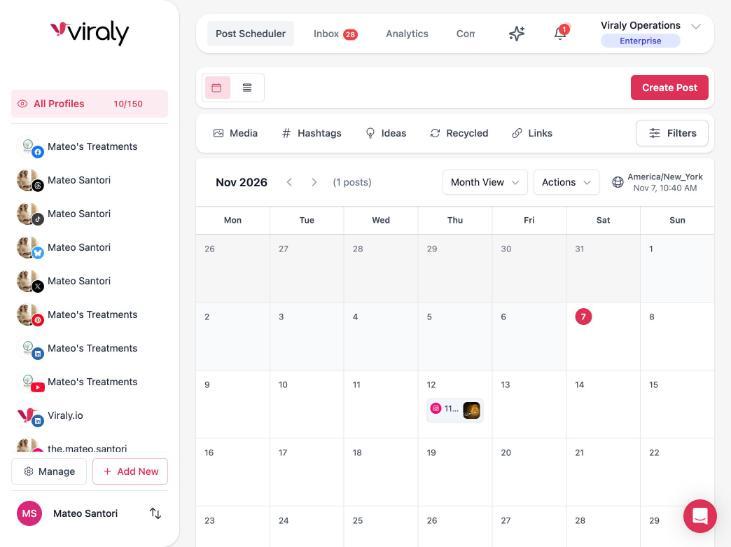
The scheduler at the center of Viraly, beside the inbox and analytics
One social media scheduler for 11 networks, with every post checked before it goes out
You write the post once, pick the channels and drop it on the calendar or into the queue. Viraly checks it against each network's rules and publishes it at the time you chose, first comment included where the network allows one.
- Free plan with ten posts a month on three profiles
- Ten social networks plus WordPress
- A card before the assistant changes anything
Eleven networks
Every network, with its own rules
A social media scheduling tool is only as good as its weakest network, so Viraly builds the composer around each network's own post types and limits. Here is what you can schedule on each one, with a page per network for the detail.
Feed posts, Reels, Stories and carousels, with a first comment, account, collaborator and location tags, custom Reel covers and trial Reels.
Instagram schedulerPage posts, Reels, Stories and image carousels, with a first comment, Reel collaborators, location tags and the colored text backgrounds Facebook offers.
Facebook schedulerX
Posts with up to four photos or one video, threads built in the composer and a reply added under the post. Premium accounts can use the 25,000 character limit.
X schedulerPosts to personal profiles and company pages, PDF documents, carousels of up to 20 images, native video and a first comment.
LinkedIn schedulerTikTok
Videos and photo carousels, uploaded straight to the account with the caption and hashtags. A first comment is not available on TikTok.
TikTok schedulerYouTube
Videos and Shorts, with the title, description, tags and thumbnail set in the composer and a first comment under the video.
YouTube schedulerImage, video and carousel pins to the board you choose, each with its own link and description.
Pinterest schedulerThreads
Text, photo, video and carousel posts, chains of connected threads and a reply added under the post.
Threads schedulerBluesky
Text, image, video and carousel posts, threads of 300 characters per post and a reply added under the post.
Bluesky schedulerMastodon
Toots with images, video or a carousel on any instance you connect, threads and a reply added under the post.
Mastodon schedulerWordPress
New blog posts shared to your social channels through the free Viraly plugin, the moment you publish or on the delay you set, with a composer and calendar inside WordPress for the posts you write there.
Get the WordPress pluginNot on the list today
Viraly does not publish to Google Business Profile today. The ten networks above, plus WordPress, are the full list, and each page spells out that network's limits.
The first comment on Instagram, Facebook, LinkedIn and YouTube is on every plan, Free included. On X, Threads, Bluesky and Mastodon it takes the form of a reply under the post, and that comes with the paid plans, as does X scheduling itself.
The calendar
Plan the month, not the post
A date picker schedules one post. Viraly gives you six ways to fill a month without opening each post one by one.
Month, week and list views
The calendar shows every channel in the social set by month or by week, and the list view shows the same posts in order. You move a post by dragging it, and the national, cultural and social media holidays appear on the days they fall.
Queue and posting slots
You set the weekly posting slots for each channel, in the social set's own timezone, and the queue fills them in order. A post dropped into the queue takes the next empty slot and publishes by itself when the time comes.
Categories
You group posts into categories such as tips, launches or behind the scenes. Categories are shared across your social sets, the calendar filters by them, many posts can change category in one go, and analytics show how each category performed.
Evergreen recycling
Mark a post as evergreen and Viraly schedules a copy of it every so many days, until the end date or the number of repeats you set, so the posts that keep working keep going out.
Bulk scheduling
Upload a batch of files to the media library, including multi-gigabyte videos that survive a dropped connection, and queue them across the month. Moving up to 50 posts at once is one request to the assistant and one card.
Write once, adjust per network
You write the post on one profile and Viraly mirrors it to the other channels in the social set, where you adjust the caption or the media for each network and preview how each one will show it before you schedule.
Pre-flight
Checked before it goes out
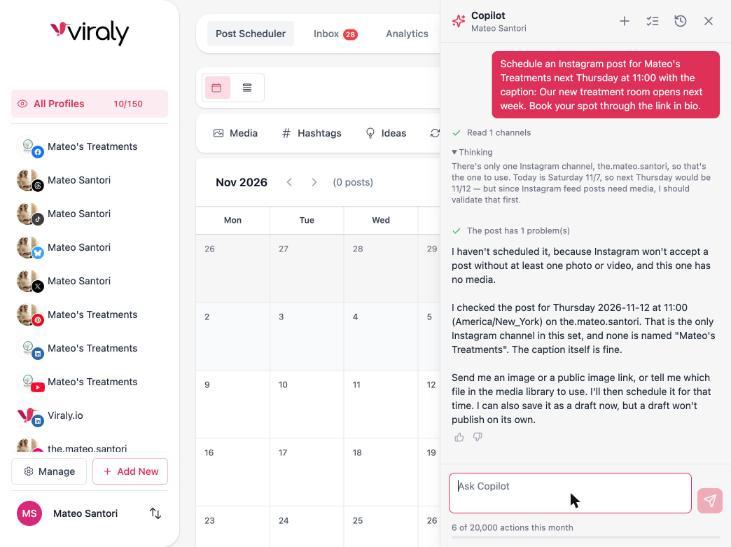
Every network has its own limits on length, file formats, sizes and aspect ratios, and a post that breaks one fails at publish time, usually at night. Viraly checks first, in three places.
In the composer
The composer counts characters against each network's limit and knows what each one accepts, from the number of photos on an X post to the length of a Short, so most problems never reach the calendar.
When the assistant schedules
Ask the assistant to schedule a post and it runs the same check before the card appears. If the post breaks a rule, it tells you which one and offers a way through, such as an image from the library or a draft for later.
Every six hours, for the next two days
The pre-flight check routine validates every post due in the next 48 hours, and the auto-fix routine makes only the safe fixes you allow, such as a media re-render or missing alt text, and never edits a caption. Both stay off until you switch them on, and a channel health watch flags the connections that would fail a post.
The assistant
Ask the scheduler to do it
Viraly's assistant works on the social set you have open, and from Influencer it can change the calendar. In the scheduler the two jobs it does most are finding the gaps and filling them, and nothing is scheduled until you confirm the card.
Read 3 drafts and 12 empty posting slots from 9 to 15 November
Schedule 3 drafts into next week's empty slots
The treatment room post goes to Tuesday 11:00 on Instagram, the before and after Reel to Thursday 11:00, and the LinkedIn update to Wednesday 09:00. Each one publishes by itself at its time. Confirm, edit the slots first, or decline.
The card names every post and every slot, and nothing moves until you confirm it.
What it does in the scheduler today
- Find the empty posting slots in a date range, earliest first
- Schedule a draft at a time you name or in the channel's next queue slot
- Move up to 50 drafts or scheduled posts to new times under one card
- Make a post evergreen with the interval and end date you give it
- Rewrite a caption for another network's style and check it against that network's rules
- Tell you when your published posts did best, so the posting slots can match
- Export a date range of posts as a CSV
Reads come back at once with a line that shows what it read. Anything that changes the calendar shows a card first and lands in the Activity log with Undo for 30 days, and publishing now always asks.
See everything the assistant does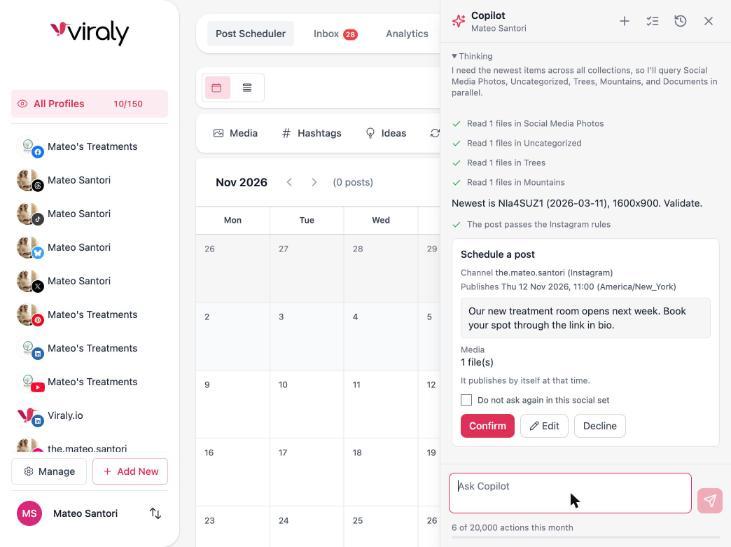
Teams
Approvals and teams
Once more than one person touches the calendar, the scheduler needs a way to hold a post until the right person has said yes, and a place for the conversation about it.
Approvals
A member marks a post for approval in the composer, or asks the assistant to send it, and the post waits as pending until an approver decides. Approvers answer in the app, or in Slack, Microsoft Teams or Discord when those are connected.
Comments on posts
Team comments sit on the post itself, with mentions and attachments, so the change request and the post stay together instead of drifting into a chat thread.
Permissions and social sets
Every brand or client is a social set with its own channels, timezone and posting slots. You assign members to the sets they work on, with permissions per member and real-time collaboration on the same calendar.
On Enterprise, agencies get a client role with a read-only login that can approve or reject posts, and the app and the reports carry the agency's own brand. and the reports carry the agency's own brand. See the white label version for agencies.
What changes by plan
The calendar, the queue and the assistant's answers come with every plan, and its scheduling cards start on Influencer. The posts, the profiles and the team grow as you move up.
- Freeten posts a month on three social profiles, with the calendar, the queue, categories, the recycler, both media editors, AI captions and the assistant included.
- Influencertwo hundred posts a month on five profiles, plus X scheduling with the long posts of a Premium account, the reply under a post and AI images.
- Businessfive hundred posts a month on fifteen profiles, three team members, approvals, comments on posts and the n8n node.
- Agencyunlimited posts on fifty profiles, unlimited team members and the public API with webhooks.
- Enterpriseunlimited posts on one hundred and fifty profiles, the white label app and the client role.
Integrations
Schedule from anywhere
The calendar is one way in. These four reach the same scheduler from the tools you already use, under the same plan limits as the app.
The WordPress plugin
Share each new blog post to your social channels the moment you publish it, after a delay or at a set time of day, with a caption template and the featured image, and schedule social posts from a composer and calendar inside WordPress. The plugin is free in the WordPress directory and works on every plan.
Get the pluginThe n8n node
A community node for n8n with triggers for new posts, channels and subscribers and operations to create and schedule posts, on n8n Cloud or your own instance. It comes with Business and up.
See the integrationsThe public API
A REST API with scoped keys for posts, channels, media, analytics and bio links, an OpenAPI spec and webhooks for the events you care about. API access comes with Agency and Enterprise.
Read the API docsThe MCP server
Claude, ChatGPT, Cursor and any MCP client get the same scheduling tools as the panel, with the scopes you grant and the same ask-first rules: reads run at once, reversible writes land in the Activity log with Undo, and anything that goes out needs your yes. The MCP server is on every plan, Free included.
Set up the MCP serverThe server applies the same rules on save whichever door a post comes in through, so a post that breaks a network's rules is refused with the reason.
What people ask about a social media scheduler
Each answer says what the scheduler does today and on which plan.
What is a social media scheduler?
A social media scheduler lets you write posts ahead of time, set the channel and the date for each one, and publishes them for you. Viraly's version covers ten networks plus a WordPress plugin from one calendar, with a queue, categories, a content recycler and a check against each network's rules before a post goes out.
How do you schedule social media posts?
Connect a channel, open the composer, write the post and add the media, then pick a time or send it to the queue. Viraly validates the post against the network's rules and publishes it at that time. You can also ask the assistant to find free slots and schedule your drafts, and it shows a card before anything changes.
Is there a free social media scheduler?
Yes. Viraly's Free plan gives you ten posts a month on three social profiles, with the calendar, the queue, categories, the content recycler, the media library with its photo and video editors, AI captions and the assistant included, and no credit card is needed. X scheduling, the reply under a post and AI images come with the paid plans.
What is the best social media scheduling tool?
The best one for you covers every network you post to with that network's own post types, shows the post as each network will display it, checks it against the rules before publishing, and lets a team approve work before it goes out. Judge any tool, Viraly included, on those four points and on real screens rather than on claims.
Can you schedule posts to all social media at once?
Yes. You write a post once, pick the channels in your social set, and Viraly mirrors it to each one, where you adjust the caption or media per network and preview it. Each network keeps its own rules, so a TikTok video and a LinkedIn document cannot be one post, and the pre-flight check names the rule a post breaks.
How far ahead can you schedule social media posts?
As far ahead as you like. Viraly only requires that the time is in the future, so a holiday post or a launch next quarter can sit on the calendar today. Switch on the channel health watch routine and it flags an expiring or failed connection and the posts that would fail because of it.
Does scheduling posts hurt reach?
No. Viraly publishes through each network's official API, which is built for exactly this, so the network receives an ordinary post with the time you chose. Reach follows how a post does once it is live, so a good slot and a quick reply to early comments matter more than how the post was created.
Can you schedule social media posts with an API or MCP?
Yes. The Viraly MCP server gives Claude, ChatGPT, Cursor and any MCP client the same scheduling tools as the app, on every plan including Free, with the scopes you grant. The REST API, with scoped keys and webhooks, comes with Agency and Enterprise, and the n8n community node comes with Business and up for self-hosted automation.
What reaches an AI model, and what does not
Prompts carry only the social set you are working in and your brief. Access tokens never enter a prompt. Comments and messages are treated as data, never as instructions. Nothing is used to train models.
Put next month on the calendar.
Start free, connect a channel and schedule the first post. The calendar, the queue and the assistant are all on the Free plan, and every post is checked before it goes out.