One workspace holds every part of the job
Social media management software with every part of the job in one place
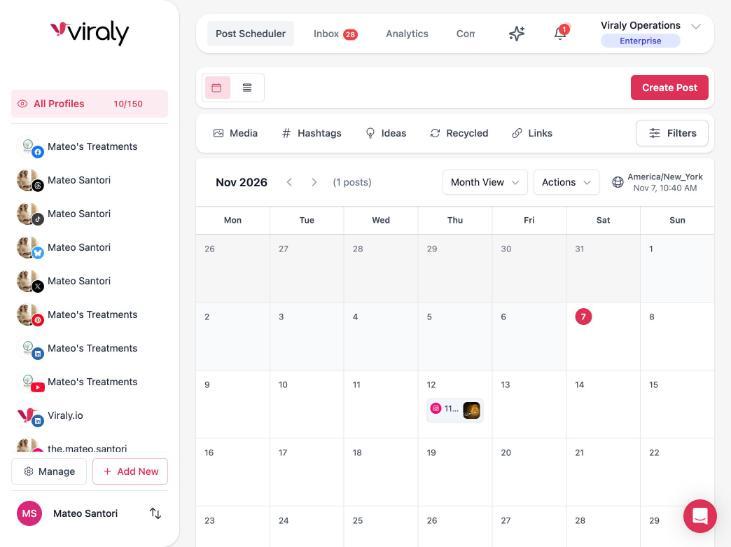
Viraly schedules posts to 11 networks, holds the comments and messages from seven in one inbox, measures every post and channel, hosts your link in bio page and runs your team's approvals, with an assistant that answers on every plan and, from Influencer, drafts the work and waits for your yes. You connect your channels once, and the whole job sits in one social media management platform.
- Scheduling covers 11 networks
- The inbox covers seven networks
- The assistant answers on every plan, Free too
The parts
What social media management software should include in 2026
The category has grown from a scheduler into the whole job: publishing, conversations, measurement, a landing page, a view of the competition, a team around it and the connections to the rest of your stack. Each part below says what Viraly includes for it and links to the page that goes deeper.
Scheduling and publishing on every network you use
A scheduler is still the center of the software, and the question is how many networks it reaches and what it checks before a post goes out. Viraly schedules to 11 networks: Instagram, Facebook, X, LinkedIn, TikTok, YouTube, Pinterest, Threads, Bluesky and Mastodon, plus WordPress through a plugin that shares each new blog post to those channels. The calendar, content queues, drafts, hashtag lists, a media library and a content recycler for evergreen posts come with every plan, and the assistant validates a post against the network's rules before it schedules it, so a post with no image is caught in the panel rather than at publish time.
See the scheduler for Instagram, Facebook, LinkedIn, TikTok, X, YouTube, Pinterest, Threads, Bluesky or Mastodon.
A unified inbox for comments and messages
Once posts go out, the replies come back on every network, and the software should put them in one queue rather than seven apps. Viraly's inbox holds the comments from Facebook, Instagram, LinkedIn, Threads, YouTube, Bluesky and Mastodon, and the direct messages where the network opens them to tools, which today means Facebook Messenger, Instagram, Bluesky and Mastodon. Labels, internal notes and snooze come with the inbox itself, saved replies come with the paid plans, and assignment and a presence badge that shows who has a conversation open come with team access on Business and up. The assistant drafts replies as notes on the conversation, and a person sends every one. The inbox comes with every plan, and conversations on X, TikTok and Pinterest do not reach it today.
Analytics and reports you can hand over
Measurement has to work at three levels: the post, the channel and the campaign across channels. Viraly reports all three on every plan, with history that reaches back two weeks on Free and two years on Agency and Enterprise. CSV exports come with Influencer and up, PDF reports with Business and up, and two routines you can switch on write the words around the numbers: a weekly digest that compares the last 7 days with the 7 before, and a monthly report with a narrative per channel and per category, both shown inside the app rather than sent by email.
A link in bio page
Most networks allow one link in a profile, so the software should host the page behind it and tell you what people clicked. Viraly's link in bio pages come with every plan, starting at one page on Free, with custom links, social icons, a media grid, embeds and a digital business card with a QR code. Email collection, page analytics, the tracking pixels and the CRM connections come with Influencer and up, and a custom domain with no Viraly branding comes with Business and up.
Competitor benchmarking
Your numbers mean more next to someone else's, so the software should watch the accounts you compete with. Viraly's competitor benchmarking comes with Business, Agency and Enterprise, for 5, 15 and 30 competitors in turn. Switch on the Competitor watch routine and it reports their top posts, cadence changes, new hashtags and the formats that worked every Monday, inside the app, and a second routine turns what worked into idea cards on your own board.
Team roles, permissions and approvals
Once more than one person works the account, the software has to say who may do what and who signs off. Viraly has an Owner who holds the workspace and its billing, Members with permissions set per person and assigned to the social sets they work in, and a Client role on Enterprise with read-only access plus the right to approve or reject a post. Post comments and approvals come with Business and up, and an approval request lands in Slack, Microsoft Teams or Discord with Approve and Reject buttons, as well as in the app.
An API, an MCP server and the connections to your stack
The software should not be a dead end, so it needs a way in for the tools you already use. Viraly's MCP server gives Claude, ChatGPT, Cursor and any MCP client 126 of the tools the assistant uses, on every plan, with the scopes you grant to the connection. The public REST API comes with Agency and Enterprise, webhooks send signed events to your own endpoint, the n8n community node runs on your own n8n, the WordPress plugin shares each new blog post to your channels, and the Slack, Microsoft Teams and Discord apps carry notifications and approvals.
How to choose
Five questions to ask before you choose
The best social media management software is the one that answers these five questions well for your team. Viraly's answer to each is one line long, limits included.
Question 1
Does it reach every network you use?
Viraly schedules to 11 networks, and the inbox covers seven of them, so comments on X, TikTok and Pinterest still live in those apps today.
Question 2
Does it catch a bad post before the network rejects it?
The assistant validates a post against the network's rules before it schedules it, and a pre-flight routine re-checks everything due in the next 48 hours.
Question 3
What does it cost when the team grows?
Viraly prices by plan, not by seat: Business includes 3 team members, and Agency and Enterprise include unlimited team members.
Question 4
Can a report go to a client as it is?
CSV exports come with Influencer and up and PDF reports with Business and up, and on Enterprise the PDF carries your logo instead of Viraly's.
Question 5
What does the AI do without asking you?
It reads and drafts on its own, while anything that changes your workspace shows a card first, publishing and replies always ask, and the routines that would act outward are switched off today.
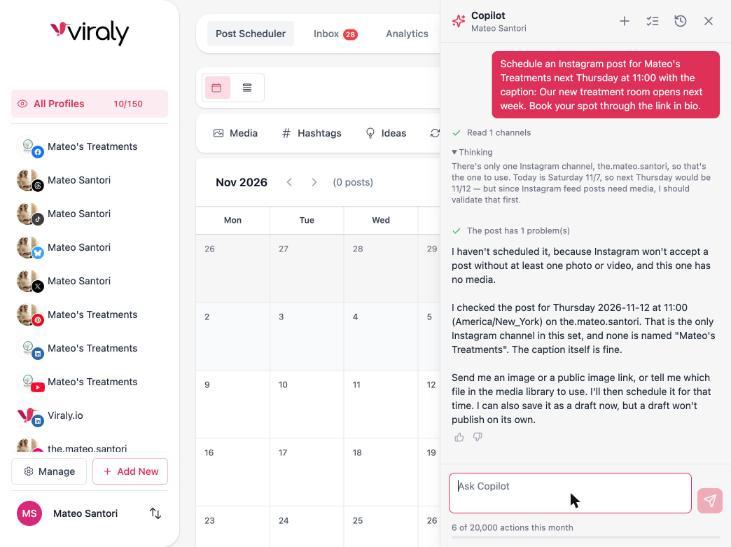
A post that fails at publish time costs you the slot and the reach, so the second question matters more than it looks. Viraly's assistant checks a post when you ask it to schedule one, and a routine checks everything due in the next 48 hours again.
Plans
Flat pricing, members included by plan
Every plan has one price, the team members are part of it, and the Free plan costs nothing. What changes as you move up is below in words, and the pricing page has the numbers.
One price per plan, no seat fees
You pay for the plan, not for each person in it. Business includes 3 team members, Agency and Enterprise include unlimited team members, and extra social profiles can be added to any paid plan when you outgrow the ones included.
What grows with the plan
Social profiles, posts per month, how far back the analytics reach, the number of link in bio pages and the number of competitors you can benchmark all grow from Free through Enterprise. Social sets, one per brand or client, are unlimited on every plan.
What switches on by plan
CSV exports start on Influencer. PDF reports, team access, approvals, competitor benchmarking, the Slack, Teams and Discord apps, the n8n node and a custom domain for bio pages start on Business. The public API starts on Agency, and white label with the Client role comes with Enterprise.
What every plan includes
Scheduling with the calendar, queues, drafts and the media library, the inbox on all seven networks, post, channel and campaign analytics, a link in bio page, the assistant's answers and the MCP server come with every plan, Free included. X scheduling, the assistant's cards and the routines start on Influencer.
The assistant
The assistant inside the software
Every plan includes Viraly's assistant, and it works on the social set you have open. You ask in plain words about your posts, inbox and numbers, a read comes straight back with a line that shows what it read, and anything that changes your workspace shows a card first, which you confirm, edit or decline.
Every change sits in the Activity log with Undo for 30 days on drafts and settings, and routines watch your channels, write digests and prepare the week's drafts in the background, each with its own switch and each reporting inside the app. Each plan comes with a monthly number of actions, and the meter at the bottom of the panel shows what is left.
See everything the assistant does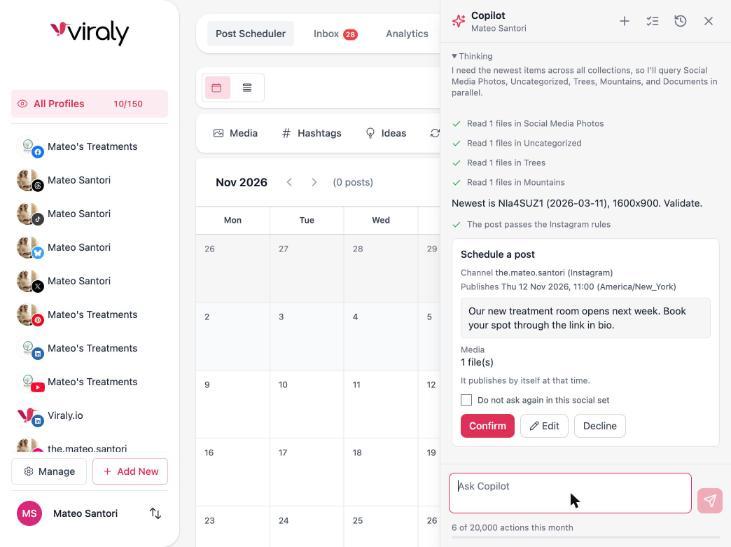
By plan
Which plan includes each part
The rows come from the same data as the pricing page. A check means the part is included on that plan, a number is the limit on that plan, and a hyphen means it is not included.
| Part | Free | Influencer | Business | Agency | Enterprise |
|---|---|---|---|---|---|
| Scheduling and publishingX scheduling starts on Influencer | 10 networks | 11 networks | 11 networks | 11 networks | 11 networks |
| Social profiles | 3 | 5 | 15 | 50 | 150 |
| Posts per month | 10 | 200 | 500 | Unlimited | Unlimited |
| Unified inboxSeven networks | Included | Included | Included | Included | Included |
| Post, channel and campaign analytics | Included | Included | Included | Included | Included |
| Analytics history | 2 weeks | 6 months | 12 months | 2 years | 2 years |
| CSV export | Not included | Included | Included | Included | Included |
| PDF reports | Not included | Not included | Included | Included | Included |
| Competitor benchmarking | Not included | Not included | 5 competitors | 15 competitors | 30 competitors |
| Link in bio pages | 1 | 5 | 15 | 50 | Unlimited |
| Bio page custom domain and no Viraly branding | Not included | Not included | Included | Included | Included |
| Team membersPermissions, post comments and approvals | Not included | Not included | 3 | Unlimited | Unlimited |
| Slack, Microsoft Teams, Discord and n8n | Not included | Not included | Included | Included | Included |
| Assistant and MCP server | Included | Included | Included | Included | Included |
| Public REST API | Not included | Not included | Not included | Included | Included |
| White label and the Client role | Not included | Not included | Not included | Not included | Included |
The assistant comes with a monthly number of actions on each plan, and the pricing page lists the plans side by side with every row.
What people ask about social media management software
Each answer names the plan or the limit where one applies.
What is social media management software?
Social media management software is one tool that plans, publishes, answers and measures your social media across networks, so you stop switching between apps. In 2026 the category covers scheduling, a shared inbox, analytics and reports, a link in bio page, competitor tracking, team approvals and an assistant that drafts the work. Viraly includes each of those parts.
What is the best social media management software?
The best social media management software covers every network you use, shows a post's problems before the network rejects it, prices by plan rather than by seat and lets a report go out as it is. Viraly does those four things across 11 networks, with an assistant that answers on every plan and, from Influencer, shows a card first.
What software do social media managers use?
Most social media managers use a scheduler, an inbox tool for comments and messages, an analytics tool for reports, a link in bio tool and a chat app for approvals, often from different vendors. Viraly puts those parts in one workspace, with a Slack, Microsoft Teams or Discord app for the approvals and an assistant to draft the work.
Is there free social media management software?
Yes. Viraly's Free plan includes scheduling to 10 networks with 3 social profiles and 10 posts a month, the unified inbox on seven networks, post and channel analytics with two weeks of history, one link in bio page, the assistant and the MCP server. It needs no credit card, and the paid plans raise the limits.
Can one tool manage all my social media in one place?
Yes, with the limits each network sets. Viraly schedules to 11 networks, has analytics for the ten social networks among them, and brings comments from seven, Facebook, Instagram, LinkedIn, Threads, YouTube, Bluesky and Mastodon, into the inbox, with messages where the network allows it. Comments on X, TikTok and Pinterest stay in those apps, and so do mentions and reviews.
What is the difference between social media management software and a scheduler?
A scheduler publishes posts at a set time, and that is where it stops. Social media management software adds the inbox for what comes back, the analytics and reports, the link in bio page, competitor tracking and team approvals, so the whole job happens in one place. In Viraly the other parts sit beside the scheduler from day one.
Is social media management software worth it for a small business?
Yes, when it replaces several tools and the hours spent copying between them. For a small business the test is whether scheduling, replies, the link in bio page and the monthly report can happen in one place, on a plan that starts free and grows when the limits are reached. Viraly's Free plan is built for that start.
What is an AI powered social media management platform?
An AI powered social media management platform is one where an assistant does part of the work inside the same tool: it drafts posts and replies, reads your numbers and writes the digest. In Viraly the assistant answers on every plan, makes changes behind a card from Influencer and keeps Undo for 30 days on drafts and settings.
What reaches an AI model, and what does not
Prompts carry only the social set you are working in and your brief. Access tokens never enter a prompt. Comments and messages are treated as data, never as instructions. Nothing is used to train models.
Put the whole job in one place.
Start free, connect a channel and schedule the first post. The inbox, the analytics, the link in bio page and the assistant are already there when you need them.