Post approvals live inside the scheduler
A social media approval tool your approvers answer in one click
A member sends a post for approval from the composer, and the approver clicks Approve in the app, in Slack, in Microsoft Teams or in Discord. Viraly keeps the comments on the post and schedules it the moment the approvals are in.
- Approve and Reject buttons in the app, Slack, Teams and Discord
- Comes with Business, Agency and Enterprise
- A post sent for approval waits until the approvers say yes
Our new treatment room opens next week. Book your spot through the link in bio.
Sofia approved with a comment:
The caption reads well and the new room looks great. Approved for Thursday.
The same request went to the approvals channel in Slack with the same two buttons.
A post waiting for approval shows who asked, who has answered, and the buttons for the person who has not. person who has not.
Step by step
How an approval works in Viraly
A social media approval workflow in Viraly has five steps, and nobody has to leave the tools they already use. Here's how it works:
- 1
A member writes the post in the composer, clicks Request Approval, names the approvers and chooses whether everyone or a minimum number has to agree.
- 2
The post saves as Pending Approval on the calendar, and nothing publishes while it waits.
- 3
Each approver gets the request in the app, and in Slack, Microsoft Teams or Discord when one of those is connected and routed, with Approve and Reject buttons on it.
- 4
An approver clicks Approve or Reject, adds a comment if they want to, and the post shows who decided and what they said.
- 5
When the approvals are in, the post moves to Scheduled and publishes at its time, and a rejection returns it to Draft so the author can fix it and ask again.
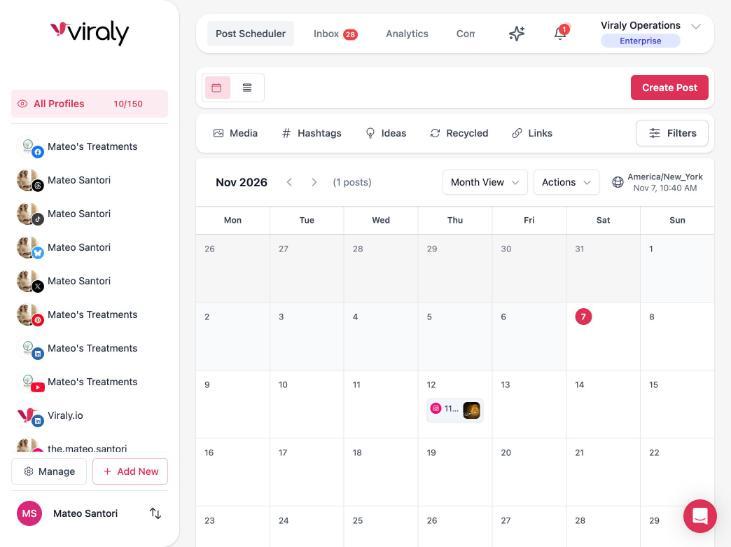
The requester can withdraw a request at any time, which also returns the post to Draft, and the author gets a notification in the app, and by email if they switch it on, when a decision comes in. Approvals apply to any post in the composer, whatever network it is for, from an Instagram Reel to a LinkedIn post.
Roles
Who can do what
A social media approval process needs clear roles, and Viraly has three: the Owner, who holds the workspace, Members, who do the work in the social sets you assign to them, and on Enterprise a Client, who sees and approves but cannot edit.
| What | Owner | Member | Client (Enterprise) |
|---|---|---|---|
| Draft and schedule posts | Yes | In the social sets assigned to them | No |
| Request approval and name the approvers | Yes | Yes | No |
| Approve or reject a post | When named as an approver | When named as an approver | When named as an approver |
| Comment on a post | Yes | Yes | With the decision |
| Edit, publish or delete a post | Yes | In the social sets assigned to them | No |
| Workspace settings and billing | Yes | The permissions you set per person | No |
| Comes with | Every plan | Business (3 team members), Agency and Enterprise (unlimited) | Enterprise, as part of white label |
Approvers are picked from the people who have access to the post's social set, and the person asking cannot name themselves. The Client role is part of white label, so an agency that wants clients to sign off without a Member seat sets that up on Enterprise. See the agency setup.
Four places, one click
Approve from where you already are
An approval only gets done when the approver sees it, so the request goes to the app and to the chat tool your team already reads. The Slack, Microsoft Teams and Discord integrations come with Business and up.
Approve in the app
Open the post from the calendar or from the In Review filter and the Approve and Reject buttons sit on it, next to who asked and how many approvals are in. A notification in the app tells each approver when a post is waiting for them.
Approve in Slack
Connect your Slack workspace, pick the channel that gets approval requests, and each one arrives with Approve and Reject buttons. One click resolves it, and /viraly commands work in the same channel.
Approve in Microsoft Teams
The Teams integration posts the request to the channel you choose with the same two buttons, and it can tell the author there when a post is approved or rejected.
Approve in Discord
Link your Discord account to your Viraly user once, route requests to a channel on your server, and approve or reject from there with the same buttons.
What email does today
Today an email can tell an approver that a post is waiting, with one button that opens the post in the app, and each person switches that email on in their notification settings. Approving from inside the email is not live yet, so the click happens in the app or in your chat tool.
Viraly does not send approval reminders today, so the best place for a request is the channel your approvers already read every day, and the assistant can tell you what is still waiting. approvers already read every day, and the assistant can tell you what is still waiting.
The assistant
Ask the assistant what is waiting
Viraly's assistant knows the approvals in the social set you have open. It lists what is pending, prepares a request for you from Influencer, and leaves every decision to a person.
Open the panel on any page and ask what is still waiting for approval. It lists the pending posts in the social set you have open, so the question of what is stuck gets answered in one line instead of a scroll through the calendar.
Ask it to send a post for approval and it shows a card with the post and the approvers before anything is sent. Ask it to approve or reject one and a card comes first there as well, and the Activity log keeps who asked and what changed.
Through the Viraly MCP server, Claude or ChatGPT can list the pending approvals and the comments on a post, and only list them. Requesting, approving and rejecting stay inside the app.
See everything the assistant doesRead 2 posts pending approval and the team members in this set
Request approval for the Thursday Reel from Sofia and Priya
Both approvers have access to this set and both have to agree. Once you confirm, the post saves as Pending Approval and the request reaches them in the app and in Slack.
The assistant prepares the request and a person confirms the card. The decision to approve stays with a person too.
Plans
On these plans
Social media approvals in Viraly come with the plans built for a team, so the social media approval software and the scheduler are the same tool.
Free and Influencer
These plans are for one person, so they have no team seats, and post approvals, team comments and the chat integrations are not part of them. Everything you schedule publishes on your own say-so.
Business
Post approvals, team comments on posts and the Slack, Microsoft Teams and Discord integrations come with Business, together with 3 team members, permissions per person and in-app notifications.
Agency
Agency carries the same approvals, comments and integrations with unlimited team members, so every account manager and every reviewer gets a seat of their own.
Enterprise
Enterprise adds the Client role, built for client approval without client edits, plus white label on the app and emails. The webhooks that fire when a post is sent for approval, approved, rejected or withdrawn come with Agency and Enterprise.
The assistant answers on every plan and acts from Influencer, with a monthly number of actions that grows as you move up, and the meter at the bottom of the panel shows what is left this month.
What people ask about a social media approval tool
Each answer says who can do what and on which plan.
What is a social media approval tool?
A social media approval tool holds a post back until the people you name have said yes. In Viraly the author requests approval from the composer, the approvers get Approve and Reject buttons in the app, and in Slack, Microsoft Teams or Discord when connected, and the post schedules itself the moment the approvals are in.
Who can be named as an approver?
You can name any member with access to the post's social set, and on Enterprise a Client as well, so an agency can make the client the approver. The person asking cannot name themselves. Approvers are picked in the composer when the request is made, and the post waits as Pending Approval until the approvals are in.
Can clients approve posts without a Viraly login?
No. Every Approve click, in the app or in a chat tool, is matched to a person in your workspace, so an approver needs a seat. On Enterprise the Client role gives a client a login that sees the calendar and analytics and approves or rejects without editing anything. On Business and Agency the approver holds a Member seat.
Can you approve social media posts from Slack, Microsoft Teams or Discord?
Yes. Connect the integration on Business or above and route approval requests to a channel. Each request arrives with Approve and Reject buttons, one click resolves it, and the decision shows on the post in Viraly. The author can be told in the same channel when a post is approved or rejected.
What happens when a post is rejected?
The post returns to Draft and nothing publishes. The author gets a notification, with the approver's comment when one was left, edits the post and requests approval again. When everyone named has to agree, one rejection sends the post back, and when a minimum number is set, it goes back once too many people have said no.
Does Viraly send approval reminders?
No. Viraly sends the request once, in the app and in the chat tool you connected, and does not chase an approver who has not answered. So route requests to a channel your approvers read every day, and ask the assistant each morning what is still waiting in the set you have open.
What approval workflow do you need for AI-assisted content?
You need a content approval workflow where a person reads every post before it publishes. Viraly's assistant drafts posts and can send one for approval, but it shows a card before the request goes out and never approves a post on its own. Name the approvers in the composer and the post stays Pending Approval until they say yes.
Which Viraly plans include post approvals?
Post approvals come with Business, Agency and Enterprise. They arrive together with team comments on posts and the Slack, Microsoft Teams and Discord integrations on Business, with 3 team members. Agency raises that to unlimited team members, and Enterprise adds the Client role for approvers who should see but not edit. Free and Influencer are plans for one person.
What reaches an AI model, and what does not
Prompts carry only the social set you are working in and your brief. Access tokens never enter a prompt. Comments and messages are treated as data, never as instructions. Nothing is used to train models.
Send the next post for approval.
Start free to see the composer, then move to Business when the team arrives: approvals, comments and the chat integrations switch on together, and the assistant tells you what is waiting.
Team comments
Comments on the post, not in email threads
An approval slows down when the change request lives somewhere other than the post. In Viraly the comments live on the post, so the history of a post is on the post.
One thread lives on each post
Any member can comment on a post, and the approver's comment with the decision shows on the post too, so a rejection arrives with its reason whenever the approver gives one.
Tag the person you need
Tag a teammate in a comment and they get a notification, so the question about the caption reaches the person who wrote it instead of the whole team.
Nothing here reaches a network
Team comments on posts are separate from the inbox, which holds the comments your audience leaves, and nothing written here ever reaches a network. Ask the assistant what the comments on a post say and it reads them back to you.
Can we say opens Monday instead of next week? The booking page goes live on Monday.
Changed to Monday, and the image is now the finished room. @Sofia, it is ready for you.
Good to go. Approved for Thursday.
Approved by Sofia and Priya. Scheduled for Thu 12 Nov, 11:00.